

01
Nov
Timing Without delay()
Draft. This tutorial has not been checked against the physical product yet. Confirm wiring, pin assignments and voltage limits against the product documentation before building it.
| Difficulty | Intermediate |
|---|---|
| Category | Concepts |
| Supported boards | Arduino Uno R3 and compatible ATmega328P boards |
| Time needed | 40 minutes |
| Prerequisites | Dimming and Speed Control with PWM |
| Tested board | Not yet verified |
| Tested on | Not yet verified |
| Arduino IDE version | Not yet verified |
| Library | Not yet verified |
What this covers
delay() is the first thing every Arduino tutorial teaches and the first thing every real project has to stop using. This explains why, and gives you the pattern that replaces it.
It is the single step that separates a demonstration from something that works.
Before you begin
Two LEDs with resistors, on pins 9 and 10, and ideally a push button on pin 2. Everything here can be followed with one LED, but the point lands harder with two.
The problem
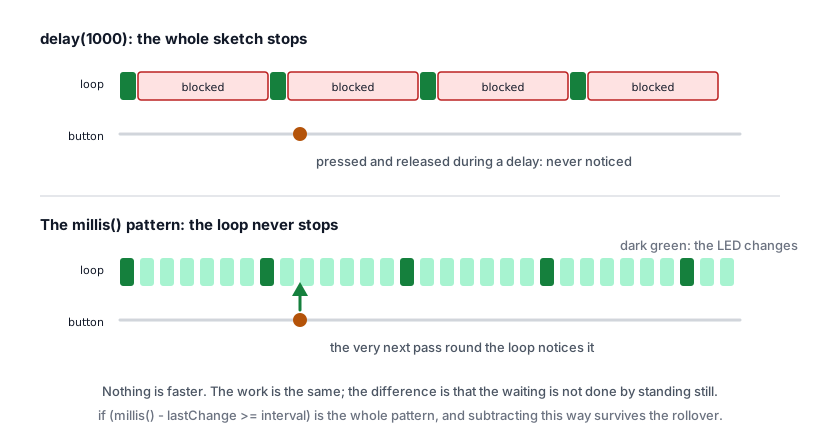
delay(1000) does not schedule anything. The chip stops and counts. For that whole second it cannot read a sensor, notice a button, update a display or answer a serial command.
In a blink sketch that costs nothing. In the traffic light, it means a pedestrian button pressed during the green phase is not ignored on purpose, it is never seen at all. The press happened while the program was asleep.
The symptom is always the same: the project works, but it responds late or misses things, and the delay is exactly as long as the delay you wrote.
The idea
Instead of stopping, the program keeps running and checks the time each pass: has enough time gone by to do the next thing?
millis() returns the number of milliseconds since the board started. It does not stop anything.
unsigned long now = millis();

if (now - lastChange >= interval) {
  lastChange = now;
  // Time to act.
}
That is the whole pattern. loop() runs thousands of times a second, almost always doing nothing but checking, and acts on the pass where enough time has gone by.
Minimal working example
Two LEDs, different rates, from one loop. With delay() this is awkward. Here it is just two copies of the same four lines.
// Siratek: two LEDs blinking at different rates, without delay().

const int ledA = 9;
const int ledB = 10;

const unsigned long intervalA = 250;
const unsigned long intervalB = 1000;

unsigned long lastA = 0;
unsigned long lastB = 0;

bool stateA = false;
bool stateB = false;

void setup() {
  pinMode(ledA, OUTPUT);
  pinMode(ledB, OUTPUT);
  Serial.begin(9600);
  Serial.println("Siratek: non-blocking blink.");
}

void loop() {
  unsigned long now = millis();   // Read the clock once per pass.

  if (now - lastA >= intervalA) {
    lastA = now;
    stateA = !stateA;
    digitalWrite(ledA, stateA);
  }

  if (now - lastB >= intervalB) {
    lastB = now;
    stateB = !stateB;
    digitalWrite(ledB, stateB);
  }

  // The loop is free. Anything added here still runs thousands of times a second.
}
Add Serial.println("working"); at the bottom of loop() and you will see it printing constantly between blinks. That free time is what the whole technique buys.
unsigned long, and why it matters
millis() returns an unsigned long. Your variables that hold it must be unsigned long too.
An int on an Uno holds up to 32767, which millis() passes after 32.7 seconds. A timer stored in an int works perfectly on the bench and then misbehaves once the project has been running for half a minute, which is a miserable bug to find.
The rollover, and why subtraction survives it
millis() runs out of room and returns to zero after about 49.7 days.
Written as a subtraction, the pattern keeps working anyway:
if (now - lastChange >= interval) // correctUnsigned arithmetic wraps the same way the counter does, so the difference comes out right even across the rollover. Written as a comparison against a target, it does not:
if (now >= lastChange + interval) // wrong once millis() wrapsThat version stops working for the rest of the run, 49 days in. You will not catch it in testing. Always subtract.
Doing it with a button
This is the version the traffic light needs: a cycle that runs on time while still noticing a press the moment it happens.
const int buttonPin = 2;
const int ledPin = 9;

unsigned long lastBlink = 0;
const unsigned long blinkInterval = 500;
bool ledState = false;

int lastButton = HIGH;

void setup() {
  pinMode(buttonPin, INPUT_PULLUP);
  pinMode(ledPin, OUTPUT);
  Serial.begin(9600);
}

void loop() {
  unsigned long now = millis();

  if (now - lastBlink >= blinkInterval) {
    lastBlink = now;
    ledState = !ledState;
    digitalWrite(ledPin, ledState);
  }

  int button = digitalRead(buttonPin);
  if (button == LOW && lastButton == HIGH) {
    Serial.println("pressed, and the blink never paused");
  }
  lastButton = button;
}
Press it mid-blink. The message appears immediately and the LED keeps its rhythm.
When delay() is still fine
It is not banned. A short pause at the end of a loop that only prints a reading is harmless, and clearer than the alternative. Some sensors need a brief settling pause that nothing else can use.
The rule is about what else the project has to do. If nothing is waiting, delay() costs nothing. As soon as something has to be noticed while you wait, it has to go.
Check yourself
- Your timer variable is an
int. What happens after 33 seconds? - Why is
now - last >= intervalsafer thannow >= last + interval? - A button is pressed during
delay(2000). Is it queued? - What does
millis()stop while it counts?
Answers in order: the int overflows and the timing breaks, having worked perfectly until then. Subtraction wraps correctly with the counter; the addition does not, and fails after about 49 days. No, nothing records it; the press is gone. Nothing, which is the entire point.
Troubleshooting
| Symptom | Likely cause | Check or fix |
|---|---|---|
| Works, then breaks after half a minute | Timer stored in an int |
Use unsigned long |
| Everything runs at once | lastChange not updated inside the if |
Set it to now when you act |
| Timing drifts slowly | lastChange = millis() called again after work |
Reuse the now read at the top |
| Button still missed | A delay() left elsewhere in the loop |
Search the sketch for it |
| LED never changes | stateA not stored between passes |
It must be global, not inside loop() |
| Interval ignored | Interval is an int and too large |
Make intervals unsigned long |
Next steps
- Easier first: Dimming and Speed Control with PWM.
- Next: Making a Button Behave, which uses this pattern to debounce a switch properly.
- Then: go back to the traffic light and give it a pedestrian button.
Sources and attribution
All text and code in this tutorial are original Siratek work.
- Arduino core documentation for
millis()and its return type. - ATmega328P datasheet for the timer behind it.
No third-party tutorial text, diagrams, photographs or code has been reproduced here.