

01
Nov
Mixing Colours with an RGB LED
Draft. This tutorial has not been checked against the physical product yet. Confirm wiring, pin assignments and voltage limits against the product documentation before building it.
| Difficulty | Beginner |
|---|---|
| Category | Outputs |
| Supported boards | Arduino Uno R3 and compatible ATmega328P boards |
| Time needed | 40 minutes |
| Prerequisites | Your First Circuit, an LED and a Resistor |
| Tested board | Not yet verified |
| Tested on | Not yet verified |
| Arduino IDE version | Not yet verified |
| Library | Not yet verified |
What it does
An RGB LED is three LEDs in one clear package, one red, one green, one blue, sharing a single common leg. Drive them at different brightnesses and the eye blends the result into one colour.
It is the natural next step after a single LED, because it needs everything you already know applied three times, and it is the first part where PWM earns its place: without varying brightness you get seven fixed colours, and with it you get any of them.
Before you begin
Required parts and tools
- An Arduino Uno or compatible board.
- One 5 mm RGB LED with four legs.
- Three 220 ohm resistors. One per colour, not one for the lot.
- A breadboard and four jumper wires.
Four legs, and which is which
The longest leg is the common one, and it sits second from one end. The other three are red, green and blue, and on the usual arrangement the order is red, common, green, blue.
Do not trust that order on a part you have not checked. Legs get trimmed, and suppliers differ.
Common anode or common cathode
This is the one thing that matters and the one thing a photograph cannot tell you. The two kinds look identical.
- Common cathode: the shared leg goes to
GND, and a pin set HIGH lights its colour. - Common anode: the shared leg goes to
5V, and a pin set LOW lights its colour.
Test it in ten seconds, with the board unplugged from nothing more than your patience:
- Put a 220 ohm resistor in series with a jumper from
5V. - Touch the common leg to
GND, and touch the resistor lead to one of the other three. - If it lights, you have a common cathode.
- If not, swap: common leg to
5Vthrough the resistor, other leg toGND. If it lights now, it is a common anode.
The rest of this tutorial is written for a common cathode. If yours is a common anode, the wiring changes only in where the common leg goes, and the sketch needs every value inverted. Both are shown.
One resistor per colour
A single resistor on the common leg seems tidy and is wrong. The three colours have different forward voltages, so they would draw different currents through one shared resistor, and the brightness of each would change depending on which others were lit. Colours would shift as you mixed them.
Three resistors, one in each colour leg, keeps each channel independent.
Pin reference
| Pin or label | Connect to | Purpose | Notes |
|---|---|---|---|
| Red leg | D9 through 220 ohms |
Red channel | PWM pin |
| Common, the longest leg | GND |
Shared return | 5V instead, on a common anode |
| Green leg | D10 through 220 ohms |
Green channel | PWM pin |
| Blue leg | D11 through 220 ohms |
Blue channel | PWM pin |
All three must be PWM pins, or you lose colour mixing and get only the eight on-off combinations. Pins 9, 10 and 11 are convenient and adjacent. Note that tone() would take 11 away, so a project with sound should use 3, 5 or 6 instead.
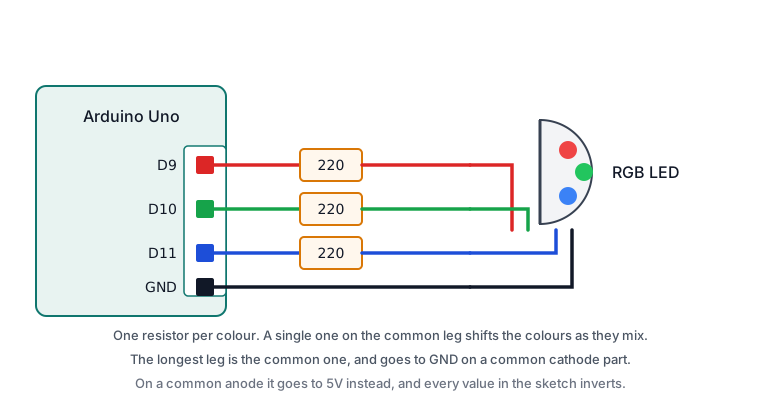
Wiring steps
- Unplug the USB cable.
- Place the LED with each leg in its own row.
- Run the common leg to
GND, or to5Vif your part is a common anode. - Put a 220 ohm resistor from the red leg’s row to a free row, and wire that row to
D9. - Repeat for green to
D10and blue toD11. - Check that no two legs share a row.
- Plug the USB cable back in.
Software and libraries
No library is required.
Minimal working example
// Siratek: mixing colours on an RGB LED.
// Written for a common cathode. See the note below for a common anode.

const int redPin = 9;
const int greenPin = 10;
const int bluePin = 11;

void setColour(int red, int green, int blue) {
  analogWrite(redPin, red);
  analogWrite(greenPin, green);
  analogWrite(bluePin, blue);
}

void setup() {
  pinMode(redPin, OUTPUT);
  pinMode(greenPin, OUTPUT);
  pinMode(bluePin, OUTPUT);

  Serial.begin(9600);
  Serial.println("Siratek: RGB LED starting.");
}

void loop() {
  Serial.println("red");
  setColour(255, 0, 0);
  delay(1000);

  Serial.println("green");
  setColour(0, 255, 0);
  delay(1000);

  Serial.println("blue");
  setColour(0, 0, 255);
  delay(1000);

  Serial.println("yellow");
  setColour(255, 255, 0);
  delay(1000);

  Serial.println("white");
  setColour(255, 255, 255);
  delay(1000);

  Serial.println("off");
  setColour(0, 0, 0);
  delay(1000);
}
For a common anode
Everything inverts: 255 becomes off and 0 becomes full. Change one function and leave the rest of the sketch alone.
void setColour(int red, int green, int blue) {
  analogWrite(redPin, 255 - red);
  analogWrite(greenPin, 255 - green);
  analogWrite(bluePin, 255 - blue);
}
Writing it this way means the rest of your code still asks for the colour it wants, and only one place knows which kind of LED is fitted.
Expected result
Six states, a second each: red, green, blue, yellow, white, off.
Two things are normal. The white will not be a clean white, because the three dies have different efficiencies and the eye is most sensitive to green; a believable white usually needs the red and green pulled back, something like setColour(255, 180, 140), found by eye for your part.
And the colours are mixed by your eye, not by the LED. Look closely and you can see the three separate dies inside the package.
Troubleshooting
| Symptom | Likely cause | Check or fix |
|---|---|---|
| Nothing lights at all | Common leg not connected | Check it reaches GND, or 5V for a common anode |
| Colours are inverted | Wrong type assumed | Use the inverting setColour() |
| Lit when it should be off | Common anode driven as common cathode | Same fix as above |
| Only one colour works | Two legs sharing a breadboard row | Give each its own row |
| No mixing, only solid colours | Not all three on PWM pins | Use 3, 5, 6, 9, 10 or 11 |
| Brightness shifts as colours mix | One resistor on the common leg | Fit one resistor per colour |
| Blue much dimmer than expected | Higher forward voltage | Expected; lower the red and green instead |
| Blue stops working with sound | tone() has taken pin 11 |
Move that channel to 3, 5 or 6 |
Next steps
- Easier first: Your First Circuit, an LED and a Resistor.
- Related: Dimming and Speed Control with PWM, which explains what
analogWrite()is doing. - Next project: drive the colour from a potentiometer, or use it as a status light that goes green, amber and red from a sensor reading.
Sources and attribution
All text, wiring guidance and code in this tutorial are original Siratek work.
- Arduino core documentation for
analogWrite().
Leg order and the common-anode or common-cathode type vary between suppliers, so this tutorial gives a test rather than asserting either. No third-party tutorial text, diagrams, photographs or code has been reproduced here.