

01
Nov
Reading a Datasheet
Draft. This tutorial has not been checked against the physical product yet. Confirm wiring, pin assignments and voltage limits against the product documentation before building it.
| Difficulty | Intermediate |
|---|---|
| Category | Concepts |
| Supported boards | Arduino Uno R3 and compatible ATmega328P boards |
| Time needed | 40 minutes |
| Prerequisites | Digital and Analog, and When Each Applies |
| Tested board | Not yet verified |
| Tested on | Not yet verified |
| Arduino IDE version | Not yet verified |
| Library | Not yet verified |
What this covers
How to get an answer out of a forty-page PDF in two minutes.
Every tutorial in this library eventually says “check the datasheet”, and that advice is useless if nobody has shown you that a datasheet is not meant to be read. It is a reference book. You go in with a question, find the one table that answers it, and leave.
This page is about which questions to ask, and which numbers lie.
Before you begin
Nothing to buy. Have a part in front of you with a number printed on it — Identifying Components covers reading those markings — and find its datasheet by searching for that number and the word “datasheet”.
Prefer the manufacturer’s own PDF over a reseller’s page. Resellers copy each other, including each other’s mistakes.
The four questions
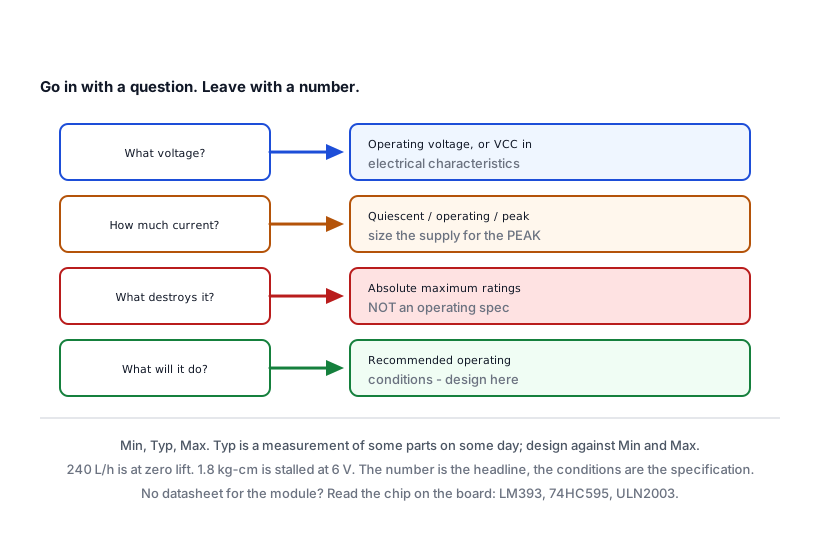
Almost everything you will ever need is one of these.
1. What voltage does it want?
Look for Operating Voltage, or a supply range like VCC or VDD in the electrical characteristics table.
What you want is the range: minimum, typical, maximum. A part marked “3.3 V” that tolerates 2.7 to 3.6 is a different proposition from one that tolerates 3.0 to 3.5.
2. How much current does it take?
Usually given in several figures, and the gap between them is the point:
| Figure | Means |
|---|---|
| Quiescent, standby, sleep | Doing nothing |
| Operating, active | Normal running |
| Peak, surge, transmit | The worst moment |
Size your supply for the peak, not the average. The SIM800L averages a little and demands two amps for a fraction of a second while it transmits, and a supply chosen on the average figure makes it reboot. Powering Your Project is the page.
3. What are its absolute maximum ratings?
This table is always near the front and it is the most misread page in electronics.
Absolute maximum is not an operating specification. It is the value beyond which the part may be destroyed. Running at it is not a plan; it is the edge of the cliff, not the path.
The operating range is a separate table, and it is the one that tells you what the part will actually do. If a pin is rated for an absolute maximum of 40 mA and a recommended 20 mA, design for 20.
4. Which number is “typical”?
Columns are usually Min, Typ, Max, and Typ is a measurement of some parts at some temperature. It is not a promise.
Design against Min and Max. If a sensor’s response time is typically 2 seconds and maximally 10, your sketch has to work at 10.
The three sections that answer most questions
The pinout diagram, usually on page 1 or 2. It tells you which leg is which. Check whether it is drawn looking at the top of the part or the bottom — the datasheet says, and getting it the wrong way round is a classic way to connect a part backwards.
The electrical characteristics table, usually a third of the way in. Voltages, currents, thresholds, timing. This is where you spend your two minutes.
The application circuit, often near the end. The manufacturer showing you how they expect it to be used, including the resistors and capacitors around it that nobody mentions anywhere else. If your circuit does not look like theirs, it is worth knowing why.
What you can usually skip: the packaging drawings, the ordering information, the tape-and-reel specifications and the long register maps, unless you are writing a driver from scratch.
Worked example: can this pin drive this LED?
A question this library answers by rule of thumb; here is where the rule comes from.
The ATmega328P datasheet gives, for an output pin:
- Absolute maximum current per pin: 40 mA
- Recommended, in the operating conditions: 20 mA
- Maximum total through all pins at once: 200 mA
An ordinary red LED wants about 20 mA and drops about 2 V. On a 5 V pin:
resistor = (5 V - 2 V) / 0.020 A = 150 ohmsSo 150 ohms gives 20 mA — the recommended maximum, with nothing spare — and the 220 ohms this library uses everywhere gives about 13 mA, which is comfortably inside it and still bright.
Now the part people miss. Eight LEDs at 20 mA is 160 mA, which is below the 200 mA total but close enough that adding a ninth is a problem. That total, not the per-pin figure, is why a project with a row of LEDs needs a shift register and a separate supply rather than eight pins.
Two numbers from one table, and a design decision falls out of them.
What the marketing says, and what the table says
Product listings quote the best number. The datasheet gives the conditions attached to it, and they are rarely the conditions you are building in.
- A pump’s 240 litres per hour is at zero lift. At a metre it is considerably less.
- A servo’s 1.8 kg-cm is at 4.8 V, stalled, for an instant.
- A radio’s 100 metre range is in open air with nothing in between.
- A battery’s 2000 mAh is at a slow discharge and a fresh cell.
None of those are dishonest. They are all measured under stated conditions, and the conditions are in the datasheet. The number is the headline; the conditions are the specification.
This is the habit worth building: when a figure matters to your design, go and find the sentence under the table that says how it was measured.
When there is no datasheet
Common with the small sensor modules in this library. A module is a chip plus some passives, and the chip has a datasheet even if the board does not.
So: find the chip’s marking — LM393, 74HC595, ULN2003 — and read that. The board’s own behaviour, particularly what its trimmer does and whether its output is active high or low, is then something you establish by measuring. Using a Multimeter is that page, and several tutorials here settle such a question with a procedure for exactly this reason.
Check yourself
A part’s absolute maximum supply is 6 V. Is 5.5 V a good operating voltage? Not on that evidence. Find the recommended operating range; absolute maximum is where damage begins.
A sensor is “typically accurate to 2%”. Over what range, at what temperature, and what is the worst case? The table has three columns for a reason.
A module lists 150 mA. Is that idle, running or peak? Until you know, you cannot choose a supply.
Troubleshooting
| Symptom | Likely cause | Check or fix |
|---|---|---|
| Part destroyed at a “safe” voltage | Read the absolute maximum as an operating spec | They are different tables |
| Board resets when a module acts | Sized the supply for the average | Find the peak figure |
| Pin seems weak | Designed at the per-pin maximum | Recommended is half of it |
| Several outputs misbehave together | Total current across all pins | 200 mA on an ATmega328P |
| Reality far below the quoted figure | The conditions attached to it | Read the note under the table |
| Two datasheets disagree | One is a reseller’s copy | Prefer the manufacturer’s PDF |
| No datasheet for the module | There rarely is one | Read the chip on the board instead |
| Pinout connected backwards | Diagram drawn from the other side | It says top view or bottom view |
| Timing intermittent | Designed against Typ |
Design against Max |
Next steps
- Easier first: Identifying Components, for getting the number off the part.
- Related: Powering Your Project, which is mostly the current question applied.
- Use it: Uno, Nano, Mega, Pro Mini or ESP32 compares boards using exactly these tables.
Sources and attribution
All text in this tutorial is original Siratek work.
- The ATmega328P figures in the worked example — 40 mA absolute maximum per pin, 20 mA recommended and 200 mA total — are from that chip’s datasheet.
- The examples of headline figures and their conditions are drawn from parts covered elsewhere in this library, and each of those pages carries its own sourcing.
No third-party tutorial text, diagrams, photographs or code has been reproduced here, and no datasheet is reproduced or quoted beyond the individual figures named above.