

01
Nov
Voltage, Current and Resistance
Draft. This tutorial has not been checked against the physical product yet. Confirm wiring, pin assignments and voltage limits against the product documentation before building it.
| Difficulty | Beginner |
|---|---|
| Category | Foundations |
| Supported boards | Any Arduino or ESP32 board |
| Time needed | 30 minutes |
| Prerequisites | How an Arduino Actually Works |
| Tested board | Not yet verified |
| Tested on | Not yet verified |
| Arduino IDE version | Not yet verified |
| Library | Not yet verified |
What this covers
Enough electrical theory to stop you destroying parts, and no more. Three quantities, one equation, and the two calculations you will actually do: choosing a resistor for an LED, and working out whether a pin can drive something.
Before you begin
Nothing to wire. A calculator helps. If you have a multimeter, keep it nearby, because every quantity here is one you can measure rather than take on trust.
The three quantities
| Quantity | Unit | A rough picture | What it does to parts |
|---|---|---|---|
| Voltage | volts, V | The pressure pushing electricity along | Too much punches through insulation and destroys a chip |
| Current | amps, A | How much is actually flowing | Too much heats things until they fail |
| Resistance | ohms, R | How hard it is to push through | Sets how much current a given voltage produces |
The distinction that matters: you choose the voltage, the circuit decides the current. You connect something to 5 V, and what flows is whatever the resistance allows. This is why a part rated for 5 V can still be destroyed in a second if nothing limits the current.
Most beginner components are measured in thousandths: milliamps, written mA. An LED is happy at about 20 mA, which is 0.02 A.
Ohm’s law
One equation ties the three together.
V = I * R

voltage = current * resistance
Rearranged for the two forms you will use:
I = V / R     to find the current a resistor allows
R = V / I     to find the resistor you need for a target current
That is the whole of the theory. Everything below is this equation applied to a real part.
Why an LED needs a resistor
An LED is not a resistor. It has a roughly fixed forward voltage, which it drops across itself, and almost no resistance beyond that. Connect one directly to 5 V and the current is limited only by the wiring, which means it is not limited at all. The LED will be very bright for a moment and then permanently dark.
Forward voltage depends on colour, and varies between parts.
| LED colour | Typical forward voltage |
|---|---|
| Red | around 1.8 to 2.2 V |
| Yellow or amber | around 2.0 to 2.2 V |
| Green | around 2.0 to 3.2 V |
| Blue or white | around 2.8 to 3.4 V |
Treat these as a starting point and check the part you bought where the exact figure matters.
The calculation
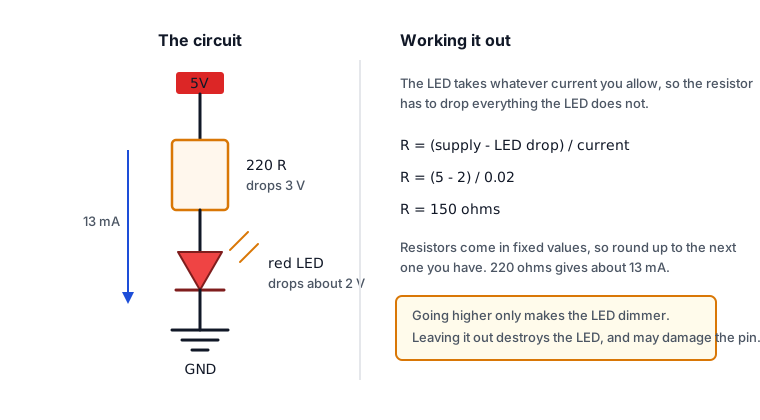
The resistor has to drop whatever the LED does not, at the current you want.
R = (supply voltage - LED forward voltage) / target currentFor a red LED on a 5 V pin at 20 mA:
R = (5 - 2) / 0.02 = 150 ohmsResistors come in fixed values, so round up to the next one you have. A 220 ohm resistor is the usual choice, gives about 13 mA, and lasts longer than a 150 ohm one. Going higher makes the LED dimmer, not faulty, so when in doubt use the larger resistor.
This is the reason a 220 ohm resistor appears in nearly every beginner kit.
What a pin can drive
An Arduino Uno pin can supply about 20 mA, with an absolute maximum of 40 mA at which damage becomes likely. Treat 20 mA as the limit.
That is enough for one LED. It is not enough for a motor, a relay coil, a filament lamp, a string of LEDs, or a buzzer that needs real volume. Those need the pin to switch a separate supply through a transistor, a MOSFET module or a relay, rather than powering the load directly.
There are two further limits worth knowing before you build something large.
- The
3.3Vpin on an Uno supplies about 50 mA in total. - The whole board has a total current limit across all pins, so twelve LEDs at 20 mA each is a problem even though each pin is individually within its rating.
Ground, and why every circuit needs it
Voltage is always a difference between two points. “5 V” means five volts higher than ground, and ground is simply the point everything else is measured against.
So a circuit needs a complete loop: out through the component and back to ground. A module connected to 5V with no GND wire has no return path, and will either do nothing or behave erratically. When two boards talk to each other, their grounds must be joined as well, or neither has a shared idea of what zero means.
If something is behaving strangely, check the ground connection first. It is the most common fault in beginner wiring, and it rarely announces itself clearly.
Series and parallel, briefly
- Series, one after another: the same current flows through each, and the voltages add up. This is why the resistor and the LED in series share the 5 V between them.
- Parallel, side by side: each sees the same voltage, and the currents add up. This is why four LEDs in parallel on one pin draw four times the current and exceed the pin’s rating.
Power and heat
P = V * I power in wattsA resistor turns the voltage it drops into heat. In the LED example, 3 V across 220 ohms at roughly 13 mA is about 0.04 W, comfortably inside the quarter-watt rating of an ordinary resistor.
It is worth calculating when you switch bigger loads. A resistor running near or above its rating gets hot enough to discolour the board, and heat is usually the first sign that something in the design is wrong.
Check yourself
- You have a blue LED and a 5 V pin, and want about 15 mA. What resistor?
- Why does using 470 ohms instead of 220 ohms not damage anything?
- A relay coil needs 70 mA. Can a pin drive it directly?
- A sensor is wired to
5Vand its signal pin, but not toGND. What will the readings do?
Answers in order: about 150 ohms, since (5 − 3) / 0.015 is 133 and you round up. The LED is dimmer because less current flows, which harms nothing. No, 70 mA is well over the 20 mA limit and needs a transistor or relay module. The readings will be meaningless, because without a return path there is no reference for the measurement.
Next steps
- Easier first: How an Arduino Actually Works.
- Next: Using a Breadboard, where these connections get made.
- Then: Your First Circuit, an LED and a Resistor, which is this page applied to real parts.
Sources and attribution
All text and calculations in this tutorial are original Siratek work.
- Arduino Uno R3 documentation and the ATmega328P datasheet, for per-pin and total current limits.
- LED forward voltages are given as typical ranges across common parts; they are not taken from any single manufacturer’s document and should be checked against the component in hand.
No third-party tutorial text, diagrams, photographs or code has been reproduced here.