

01
Nov
Uno, Nano, Mega, Pro Mini or ESP32
Draft. This tutorial has not been checked against the physical product yet. Confirm wiring, pin assignments and voltage limits against the product documentation before building it.
| Difficulty | Advanced |
|---|---|
| Category | Foundations |
| Supported boards | Arduino Uno R3, Nano, Mega 2560, Pro Mini and ESP32 |
| Time needed | 35 minutes |
| Prerequisites | Powering Your Project |
| Tested board | Not yet verified |
| Tested on | Not yet verified |
| Arduino IDE version | Not yet verified |
| Library | Not yet verified |
What this covers
Every tutorial in this library so far has assumed an Uno, because it is the right board to learn on. It is not the right board for everything you will build next.
This page is about picking the one that fits: what each board gives you, what it costs you, and the four questions that decide it without a comparison table.
Before you begin
Nothing to wire. Read this before buying a board for a project rather than after.
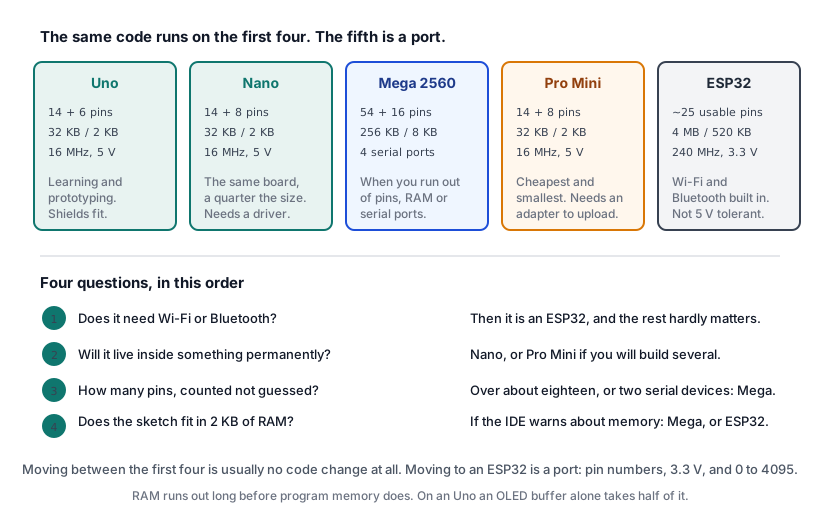
The four questions
Most board decisions come down to these, in this order.
1. Does it need Wi-Fi or Bluetooth? If yes, it is an ESP32 and the rest of the questions barely matter. Nothing else in the range does networking without a separate module, and by the time you have added one the ESP32 is cheaper and better.
2. Will it live inside something permanently? Then you do not want a board with a USB socket and a barrel jack sticking out. A Nano or a Pro Mini soldered into place is smaller, cheaper and more robust.
3. How many pins? Count them before deciding. A 16×2 LCD wired directly is twelve. A 4×4 keypad is eight. Two of those will not fit on an Uno, and that is what the Mega is for.
4. Does the sketch fit? An Uno has 32 KB of program memory and 2 KB of RAM, and the RAM runs out long before the program memory does. An OLED display takes half of it before your code starts. If the IDE warns about low memory, the answer is usually a different board.
The boards
Arduino Uno
The learning board, and the one every tutorial assumes.
What makes it right for learning is not performance. It is that the pins are in a standard header layout that shields plug into, the chip sits in a socket so a destroyed one costs very little, and every example you find online was written for it.
- 14 digital pins, 6 analog, 6 of them PWM
- 32 KB flash, 2 KB RAM, 16 MHz
- USB B socket, barrel jack
Keep it on the bench for testing. Move the finished project to something smaller.
Arduino Nano
The same chip and the same code, in about a quarter of the space. Siratek product 2224.
Everything you learned transfers exactly: same ATmega328P, same pin count, same memory, same sketches. What you lose is the shield header and the barrel jack; what you gain is a board that fits on a breadboard and can be soldered into a project.
Two practical points.
It has two more analog pins, A6 and A7, which the Uno does not. They are analog input only and cannot be used as digital pins, but they are free.
The USB chip is usually a CH340, as it is on the Siratek part, rather than the Uno’s dedicated chip. That means a driver install on Windows and macOS before the port appears. If you plug in a new Nano and no port shows up, that is the first thing to check and it is not a fault.
This is the board most Uno projects should actually be built on.
Arduino Mega 2560
For when you run out of pins. Siratek product 2229.
- 54 digital pins, 16 analog, 15 PWM
- 256 KB flash, 8 KB RAM
- Four hardware serial ports, not one
The four serial ports matter more than people expect. On an Uno, a GPS module and a Bluetooth module and the serial monitor are fighting over one hardware port, and SoftwareSerial is a poor substitute at speed. On a Mega each gets its own.
Four times the RAM is the other reason. A large display buffer plus a few sensors fits here and does not on an Uno.
It is physically large and costs more. Use it when you need it, not by default.
Arduino Pro Mini
A Nano with nothing you do not need. Siratek product 2242, the 5 V 16 MHz version.
No USB socket, no barrel jack, no voltage regulator worth the name. It is the chip, a crystal and the pins, which makes it the cheapest and smallest way to put an ATmega328P into a finished project.
The catch is uploading. You need a separate USB-to-serial adapter, connected to the six pins along one edge, every time you want to change the sketch. That is fine for something you flash once and install, and tedious while you are still developing.
Note that Pro Minis come in 5 V 16 MHz and 3.3 V 8 MHz versions, and the Siratek part is the 5 V 16 MHz one. The 3.3 V version runs at half the speed, which some libraries do not expect.
Develop on a Nano, deploy on a Pro Mini.
ESP32
A different class of board. Siratek product 2590.
- Dual core at 240 MHz, roughly fifteen times the Uno’s clock
- 520 KB RAM, over two hundred times an Uno’s
- Wi-Fi and Bluetooth built in
- 12-bit analog inputs, not 10-bit
It is also cheaper than a Mega. The reason this library teaches the Uno first is not that the ESP32 is worse; it is that it introduces several new ways to be confused at once, and they are easier to meet one at a time.
What is different, and what the ESP32 tutorials cover:
- 3.3 V logic, and not 5 V tolerant. Every 5 V sensor needs thought. See Mixing 3.3 V and 5 V Safely.
- Pin numbering is the chip’s, so
GPIO 4is4in code regardless of what the silkscreen calls it, and some pins are input-only or reserved. - Some analog pins stop working when Wi-Fi is on. That one catches everybody.
- Fewer worked examples, and some Arduino libraries do not support it.
For anything that talks to a network, a phone, or the internet, it is the obvious answer.
Choosing, in one table
| If the project… | Use |
|---|---|
| Is being learned or prototyped | Uno |
| Is finished and needs to be small | Nano |
| Needs more than about 18 pins | Mega |
| Needs more than one hardware serial port | Mega |
| Is low-cost and will be built more than once | Pro Mini |
| Needs Wi-Fi, Bluetooth or the internet | ESP32 |
| Ran out of RAM on an Uno | Mega, or ESP32 |
| Must run from a battery for months | Pro Mini, with the regulator removed |
What transfers, and what does not
Moving a sketch between the Uno, Nano, Pro Mini and Mega is usually nothing at all: same compiler, same libraries, same pin names. The Mega’s PWM and interrupt pins differ, so check those two.
Moving to an ESP32 is a port, not a copy. Expect to change:
- Pin numbers, because the mapping is different.
- Anything assuming 5 V logic.
analogRead()ranges, which run 0 to 4095 rather than 0 to 1023.tone(),Servoand some timer-dependent libraries, which behave differently or need alternatives.
None of that is hard. It is simply not free, and budgeting an afternoon for it is more realistic than expecting a recompile.
Check yourself
- Your project works on an Uno and now needs to fit inside a small box. What changes?
- The IDE warns that low memory is available and stability may be a problem. Which boards solve it?
- You plug in a brand new Nano and no serial port appears. What is the most likely cause?
- You want to send a sensor reading to a phone. Which board, and why not the others?
Answers in order: a Nano, with no code changes at all. A Mega for four times the RAM, or an ESP32 for far more; a smaller display buffer is the other route. The CH340 driver is not installed, which is normal for a new Nano on Windows or macOS. An ESP32, because everything else needs an added module that costs more than the difference.
Troubleshooting
| Symptom | Likely cause | Check or fix |
|---|---|---|
| New Nano, no serial port | CH340 driver missing | Install it; this is expected |
| Sketch compiles for Uno, not for ESP32 | Library has no ESP32 support | Check for an alternative |
| ESP32 analog pin reads nothing with Wi-Fi on | ADC2 is used by the radio | Use an ADC1 pin |
| Analog values four times larger than expected | ESP32 is 12-bit | 0 to 4095, not 0 to 1023 |
| Pro Mini will not upload | No USB on the board | Use a USB-to-serial adapter |
| Mega PWM pin does nothing | Different PWM pins | Check the Mega’s pin map |
| Out of RAM on an Uno | 2 KB is the real limit | Mega or ESP32 |
| 5 V sensor misbehaves on ESP32 | Logic levels | See the level shifting tutorial |
| Pro Mini runs at half speed | 3.3 V 8 MHz version | Check which you have |
Next steps
- Easier first: Powering Your Project, which applies to all of them.
- Related: Mixing 3.3 V and 5 V Safely, which the ESP32 makes necessary.
- Next: ESP32, Your First Wi-Fi Project, if question one was yes.
Sources and attribution
All text in this tutorial is original Siratek work.
- Arduino documentation for the pin counts, memory sizes and clock speeds of the Uno, Nano, Mega 2560 and Pro Mini.
- Espressif documentation for the ESP32’s cores, clock, memory and analog resolution.
- The CH340 USB chip on the Nano and the 5 V 16 MHz Pro Mini variant were read from the Siratek product listings and photographs for items 2224 and 2242.
Board variants differ between suppliers, particularly the Pro Mini’s voltage and speed and the Nano’s USB chip, so the reader is told what to check. No third-party tutorial text, diagrams, photographs or code has been reproduced here.