

01
Nov
Read a Potentiometer
Draft. This tutorial has not been checked against the physical product yet. Confirm wiring, pin assignments and voltage limits against the product documentation before building it.
| Difficulty | Beginner |
|---|---|
| Category | Inputs |
| Supported boards | Arduino Uno R3 and compatible ATmega328P boards |
| Time needed | 40 minutes |
| Prerequisites | Using a Breadboard |
| Tested board | Not yet verified |
| Tested on | Not yet verified |
| Arduino IDE version | Not yet verified |
| Library | Not yet verified |
What it does
A potentiometer is a resistor with a movable contact. Turning the shaft slides that contact along the resistive track, so the voltage at the middle pin varies smoothly between the voltages at the two ends.
This is your first analog input. A button answers one question: pressed or not. A potentiometer gives a whole range, and the technique is the same one used to read a light sensor, a soil moisture probe, a joystick or a sliding fader. Learn it here on a part you can turn by hand and watch respond, and the sensors later will make sense immediately.
The B10K marking means a linear track of 10 kilohms. Linear matters: turning halfway gives roughly half the voltage. An A type is logarithmic, used for audio volume, and would not behave the way this tutorial describes.
Before you begin
Required parts and tools
- An Arduino Uno or compatible board, already set up.
- One B10K potentiometer.
- A breadboard and three jumper wires.
- A USB data cable.
How it produces a voltage
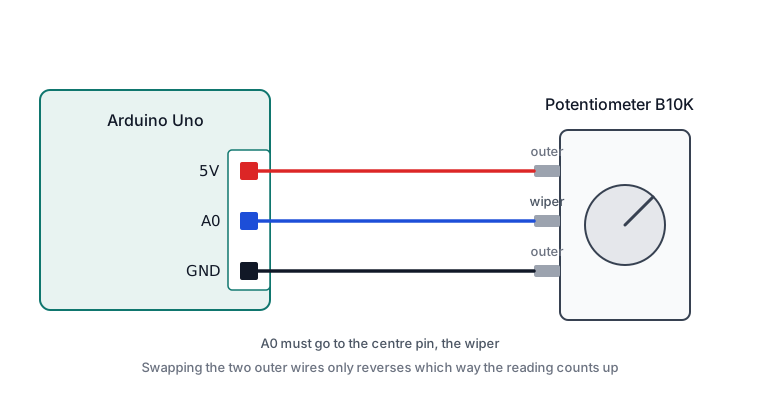
With the two outer pins connected to 5 V and ground, the full 5 V sits across the track. The middle pin, the wiper, taps off whatever fraction the shaft position selects. Fully one way it reads near 0 V, fully the other near 5 V, and anywhere between gives a proportional value.
This arrangement is a voltage divider, and it is worth recognising because most analog sensors are one: a light-dependent resistor or a thermistor replaces half the track, and the voltage moves as the sensor’s resistance changes.
What analogRead() returns
The Uno’s analog-to-digital converter has ten bits of resolution, so it reports a whole number from 0 to 1023. Zero means the pin is at ground; 1023 means it is at the reference voltage, which by default is the board’s 5 V supply.
Those are counts, not volts. To convert:
volts = reading * 5.0 / 1023.0Only six pins can do this, A0 to A5, and there is one converter shared between them, which is why reading six inputs takes six times as long as reading one.
Safety notes
A 10 k potentiometer across 5 V draws about half a milliamp, so nothing here stresses the board. Wire it with the USB cable unplugged all the same.
Pin reference
| Pin or label | Connect to | Purpose | Notes |
|---|---|---|---|
| Outer pin, either one | Uno 5V |
Top of the track | Swapping the two outer pins reverses the direction |
| Middle pin, the wiper | Uno A0 |
The varying voltage | Must be the centre pin |
| Outer pin, the other | Uno GND |
Bottom of the track | Required, or the reading will float |
Which outer pin goes to 5 V and which to ground is your choice. It only decides whether clockwise counts up or down.
Wiring steps
- Unplug the USB cable.
- Push the potentiometer into the breadboard so each of its three pins is in its own row.
- Connect one outer pin to
5V. - Connect the other outer pin to
GND. - Connect the middle pin to
A0. - Check that the middle wire really is on the centre pin. A wire one position across is the usual cause of a reading that jumps between 0 and 1023 with nothing in between.
- Plug the USB cable back in.
Software and libraries
No library is required. analogRead() is part of the Arduino core.
Minimal working example
// Siratek: reading a potentiometer.
// Prints the raw value and the voltage it represents.

const int potPin = A0;

void setup() {
  Serial.begin(9600);
  Serial.println("Siratek: turn the potentiometer.");
}

void loop() {
  int reading = analogRead(potPin);              // 0 to 1023.
  float volts = reading * 5.0 / 1023.0;          // The same value in volts.

  Serial.print("reading=");
  Serial.print(reading);
  Serial.print("  volts=");
  Serial.println(volts, 2);                      // Two decimal places.

  delay(200);
}
Note that analogRead() needs no pinMode() call. Analog input is what those pins do by default.
Using the value for something
A raw 0 to 1023 is rarely the range you want. map() rescales it, and constrain() guards against values slightly outside the expected ends.
This version dims the onboard LED, which needs 0 to 255 because analogWrite() is eight bits.
// Siratek: potentiometer controlling LED brightness.

const int potPin = A0;
const int ledPin = 9;   // Must be a PWM pin, marked with a tilde on the board.

void setup() {
  pinMode(ledPin, OUTPUT);
  Serial.begin(9600);
}

void loop() {
  int reading = analogRead(potPin);
  int brightness = map(reading, 0, 1023, 0, 255);

  analogWrite(ledPin, brightness);

  Serial.print("reading=");
  Serial.print(reading);
  Serial.print("  brightness=");
  Serial.println(brightness);

  delay(50);
}
Pin 9 is used because analogWrite() needs a PWM-capable pin. On an Uno those are 3, 5, 6, 9, 10 and 11. An LED on pin 9 needs its series resistor, as always.
Expected result
Turning the shaft slowly from one end to the other should sweep the reading smoothly from near 0 to near 1023, with the voltage tracking from about 0.00 to about 5.00.
reading=0     volts=0.00
reading=241   volts=1.18
reading=512   volts=2.50
reading=817   volts=3.99
reading=1023  volts=5.00
Two things are normal and not faults. The last digit or two may flicker when the shaft is still, because the converter is reading genuine small electrical noise. And the extreme ends may stop a little short of 0 or 1023 on some parts.
If the jitter is a nuisance, average several readings:
long total = 0;
for (int i = 0; i < 8; i++) {
  total += analogRead(potPin);
}
int reading = total / 8;
Troubleshooting
| Symptom | Likely cause | Check or fix |
|---|---|---|
| Only ever 0 or 1023, nothing between | Wiper wire not on the centre pin | Move it to the middle pin |
| Always 0 | 5V not connected, or wiper at the ground end |
Check the outer wire and turn the shaft |
| Always 1023 | GND not connected |
Connect the other outer pin to ground |
| Reading drifts with nothing touched | Wiper disconnected, pin floating | Reseat the centre wire |
| Turns the wrong way | Outer pins reversed | Swap them, or swap the ends in map() |
| Last digits always flicker | Normal converter noise | Average several readings |
| Jumps around mid-travel | Worn or dirty track | Try another potentiometer |
| LED does not dim, only on or off | Not a PWM pin | Use 3, 5, 6, 9, 10 or 11 |
Next steps
- Easier first: Seeing What Your Program Is Doing, since this tutorial lives in the Serial Monitor.
- Related product: the photoresistor, which is read exactly this way but responds to light instead of your hand.
- Next project: use the potentiometer to set the speed of the traffic light cycle, replacing the fixed delays with values you can turn.
Sources and attribution
All text, wiring guidance and code in this tutorial are original Siratek work.
- ATmega328P datasheet, for the ten-bit converter resolution.
- Arduino core documentation for
analogRead(),map()andanalogWrite().
No third-party tutorial text, diagrams, photographs or code has been reproduced here.