

01
Nov
Play Tones with a Passive Buzzer
Draft. This tutorial has not been checked against the physical product yet. Confirm wiring, pin assignments and voltage limits against the product documentation before building it.
| Difficulty | Beginner |
|---|---|
| Category | Outputs |
| Supported boards | Arduino Uno R3 and compatible ATmega328P boards |
| Time needed | 40 minutes |
| Prerequisites | Using a Breadboard |
| Tested board | Not yet verified |
| Tested on | Not yet verified |
| Arduino IDE version | Not yet verified |
| Library | Not yet verified |
What it does
A passive buzzer is a small sounder with no electronics inside. It makes no sound on its own: whatever frequency you feed it is the pitch you hear. That is the difference between the two kinds of buzzer Siratek sells, and choosing the wrong one is the most common disappointment with this part.
| Passive buzzer | Active buzzer | |
|---|---|---|
| Inside | Just the sounding element | A built-in oscillator |
| Driven with | A changing signal, such as tone() |
A steady voltage |
| Pitch | Whatever you ask for | Fixed by the manufacturer |
| Good for | Melodies, alarms with different pitches, feedback tones | A single beep with the least possible code |
Use a passive buzzer when the pitch matters. Use an active one when you only need a noise.
Before you begin
Required parts and tools
- An Arduino Uno or compatible board, already set up.
- One passive buzzer.
- A breadboard and two jumper wires.
- A USB data cable.
Identify which one you have
If the two are mixed together, the quickest test is to connect the buzzer briefly between 5V and GND. An active buzzer sounds immediately at its own pitch. A passive one gives a faint click and nothing more.
Many passive buzzers have an open underside with the element visible, while active ones are sealed. That is a useful hint, not a rule, so test rather than trust it.
Polarity
Most of these buzzers are marked, usually with a + on the top or a longer positive leg. A passive buzzer connected the wrong way round will still make a sound, but get into the habit now, because the active type does care and so does nearly everything else with a + on it.
Safety and comfort
The current is small and within what a pin can supply, so this is electrically safe.
It is, however, genuinely unpleasant to work next to. Keep test tones short, and put a resistor of around 100 ohms in series with the signal wire if you are going to be listening to it for an afternoon. That reduces the volume without affecting the pitch.
Pin reference
| Pin or label | Connect to | Purpose | Notes |
|---|---|---|---|
- or the shorter leg |
Uno GND |
Return path | |
+ or S or the longer leg |
Uno D8 |
The driving signal | Any digital pin, but see the warning below |
Choose the pin with care
tone() works by taking over one of the chip’s hardware timers. On an Uno that is Timer 2, which is also what produces PWM on pins 3 and 11.
So while a tone is playing, analogWrite() on pins 3 and 11 will not behave. If your project dims an LED on one of those pins and also makes sounds, move the LED to pin 5, 6, 9 or 10. This catches people out badly, because nothing reports an error; the brightness simply stops responding.
Pin 8 is used here because it is clear of that conflict and of the serial pins.
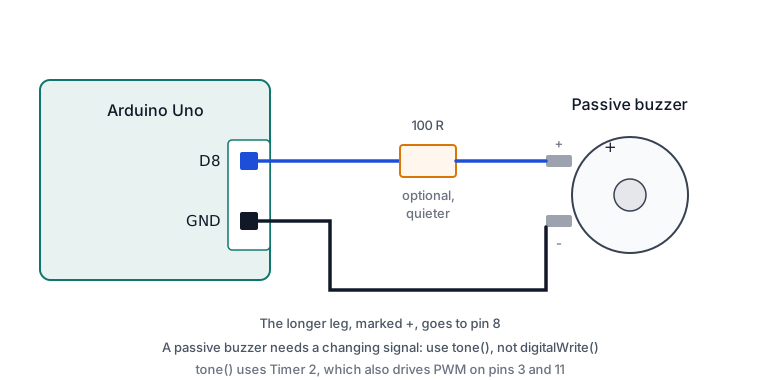
Wiring steps
- Unplug the USB cable.
- Place the buzzer on the breadboard with each leg in its own row.
- Connect the negative leg to
GND. - Connect the positive leg to digital pin
8, with a 100 ohm resistor in series if you want it quieter. - Plug the USB cable back in.
Software and libraries
No library is required. tone() and noTone() are part of the Arduino core.
Three forms are available:
tone(pin, frequency)starts a tone and leaves it running.tone(pin, frequency, duration)plays for a set number of milliseconds and stops itself. It does not block, so the program continues immediately.noTone(pin)stops a tone started by the first form.
Only one tone can play at a time. Calling tone() on a second pin stops the first.
Minimal working example
// Siratek: passive buzzer, three tones in sequence.

const int buzzerPin = 8;

void setup() {
  Serial.begin(9600);
  Serial.println("Siratek: buzzer starting.");
}

void loop() {
  Serial.println("A4 440 Hz");
  tone(buzzerPin, 440);     // Concert A.
  delay(500);

  Serial.println("C5 523 Hz");
  tone(buzzerPin, 523);
  delay(500);

  Serial.println("E5 659 Hz");
  tone(buzzerPin, 659);
  delay(500);

  noTone(buzzerPin);        // Silence.
  delay(1000);
}
A short melody
Two arrays, read in step, are all a simple tune needs. The brief gap between notes is what stops two of the same pitch running into each other.
// Siratek: playing a short melody on a passive buzzer.

const int buzzerPin = 8;

const int notes[] = { 262, 294, 330, 349, 392 };   // C D E F G
const int durations[] = { 300, 300, 300, 300, 600 };
const int noteCount = 5;

void setup() {
  Serial.begin(9600);
}

void loop() {
  for (int i = 0; i < noteCount; i++) {
    tone(buzzerPin, notes[i], durations[i]);

    // Wait for the note, plus a small gap so notes stay separate.
    delay(durations[i] + 50);
  }

  noTone(buzzerPin);
  delay(2000);
}
Useful frequencies, if you want to extend it: middle C is 262 Hz, and each octave up doubles the number. A 880 is one octave above A 440.
Expected result
Three rising tones, half a second each, then a second of silence, repeating. The Serial Monitor at 9600 baud names each one as it plays.
The melody sketch plays five rising notes and pauses.
A passive buzzer is not a loudspeaker, so the sound is thin and the very low and very high frequencies will be quiet or inaudible. Somewhere in the region of a few hundred hertz to a few kilohertz is where these parts are loudest.
Troubleshooting
| Symptom | Likely cause | Check or fix |
|---|---|---|
| No sound at all | No GND, or wrong pin |
Check both wires, then the pin number in the sketch |
| Faint clicking only | digitalWrite() used instead of tone() |
A passive buzzer needs a changing signal |
| One fixed pitch whatever you ask | It is an active buzzer | Use a passive one for melodies |
| Sound never stops | tone() without duration, and no noTone() |
Add noTone(buzzerPin) |
| Notes run together | No gap between them | Add 50 ms to the wait after each note |
| Very quiet at some pitches | Outside the element’s useful range | Stay within a few hundred Hz to a few kHz |
| PWM on pin 3 or 11 stopped working | tone() has taken Timer 2 |
Move that output to pin 5, 6, 9 or 10 |
| Second buzzer silent | Only one tone plays at a time | Drive them in turn, not together |
| Painfully loud | No series resistor | Fit about 100 ohms in the signal wire |
Next steps
- Easier first: Read a Push Button, so a press can trigger the sound.
- Related product: the active buzzer, when a single fixed beep is all a project needs.
- Next project: add the buzzer to the pedestrian crossing, sounding while the crossing phase runs.
Sources and attribution
All text, wiring guidance and code in this tutorial are original Siratek work.
- Arduino core documentation and source for
tone(),noTone()and the timer they use. - Note frequencies are from the standard equal-tempered scale at A4 = 440 Hz.
Buzzer polarity marking and the open or sealed body differ between suppliers, so both are described as things to check on the part in hand. No third-party tutorial text, diagrams, photographs or code has been reproduced here.