

01
Nov
Your First Circuit, an LED and a Resistor
Draft. This tutorial has not been checked against the physical product yet. Confirm wiring, pin assignments and voltage limits against the product documentation before building it.
| Difficulty | Beginner |
|---|---|
| Category | Outputs |
| Supported boards | Arduino Uno R3 and compatible ATmega328P boards |
| Time needed | 30 minutes |
| Prerequisites | Using a Breadboard |
| Tested board | Not yet verified |
| Tested on | Not yet verified |
| Arduino IDE version | Not yet verified |
| Library | Not yet verified |
What it does
An LED is a diode that gives off light when current passes through it the right way. Two things follow from that, and they are the whole of this tutorial: it only works one way round, and it needs something to limit the current.
This is the first circuit you build yourself rather than one already wired onto a module. Every output project after this is a variation on it, and the traffic light module you may have already used is three of these on one board with the resistors fitted for you.
Before you begin
Required parts and tools
- An Arduino Uno or compatible board, already set up.
- One 5 mm LED. Red is the easiest to start with.
- One 220 ohm resistor.
- A breadboard and two jumper wires.
Which leg is which
An LED has no markings, so it is identified by shape.
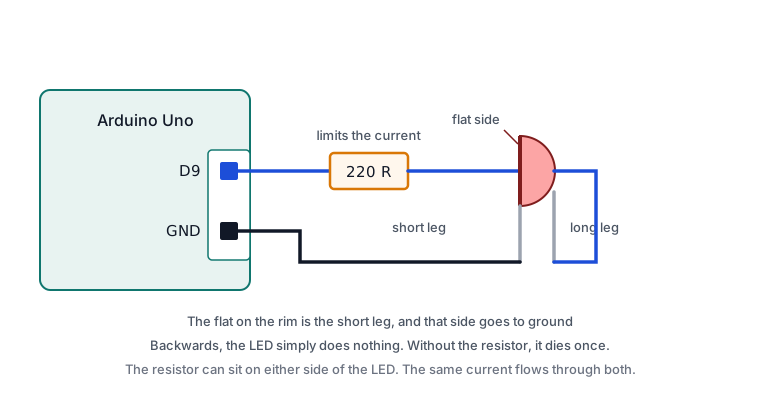
- The longer leg is the anode, the positive side. Current enters here.
- The shorter leg is the cathode, the negative side, and goes to ground.
- The rim of the plastic body has a flat spot on the cathode side. This is the reliable test, because legs get trimmed.
Connected backwards, an LED simply does nothing. It is not damaged and it is not a sign of a fault, so if your circuit is silent, turn the LED round before suspecting anything else.
Why the resistor is not optional
An LED has a roughly fixed forward voltage and almost no resistance beyond it. Connected straight to a 5 V pin, the only thing limiting the current is the wiring, which limits nothing. The LED will be very bright for an instant and then permanently dark, and the pin may be damaged with it.
Voltage, Current and Resistance works through the sum. For a red LED on a 5 V pin, 220 ohms gives about 13 mA, which is comfortable for both the LED and the pin.
The resistor can go on either side of the LED. Current is the same all the way round a series circuit, so it does not matter whether it sits before or after.
Safety notes
Nothing here is dangerous to you. Wire it with the USB cable unplugged so that a mistake is found before it is powered.
Pin reference
| Pin or label | Connect to | Purpose | Notes |
|---|---|---|---|
| LED long leg, anode | One end of the resistor | Current in | Flat spot on the body is the other side |
| Resistor, other end | Uno D9 |
The driving signal | 220 ohms for a red LED on 5 V |
| LED short leg, cathode | Uno GND |
Return path | The flat-spot side |
Pin 9 is used because it can also do PWM, which the last sketch needs. Any digital pin works for plain blinking.
Wiring steps
- Unplug the USB cable.
- Push the LED into the breadboard so its two legs are in different rows. Both legs in one row is a short, and the most expensive mistake on a breadboard.
- Put one end of the resistor in the same row as the LED’s long leg, and its other end in a free row.
- Run a wire from that free row to digital pin
9. - Run a wire from the LED’s short leg row to a
GNDpin. - Check the flat spot on the LED body is on the ground side.
- Plug the USB cable back in.
Software and libraries
No library is required. pinMode(), digitalWrite() and analogWrite() are part of the Arduino core.
Minimal working example
// Siratek: blinking an LED on a breadboard.

const int ledPin = 9;

void setup() {
  pinMode(ledPin, OUTPUT);
  Serial.begin(9600);
  Serial.println("Siratek: LED circuit running.");
}

void loop() {
  digitalWrite(ledPin, HIGH);
  delay(500);
  digitalWrite(ledPin, LOW);
  delay(500);
}
Fading it
Pin 9 can switch fast enough to make the LED look dim rather than off. analogWrite() takes a number from 0 to 255, where 0 is off and 255 is fully on.
// Siratek: fading the LED up and down.

const int ledPin = 9;

void setup() {
  pinMode(ledPin, OUTPUT);
}

void loop() {
  for (int level = 0; level <= 255; level++) {
    analogWrite(ledPin, level);
    delay(5);
  }

  for (int level = 255; level >= 0; level--) {
    analogWrite(ledPin, level);
    delay(5);
  }
}
The LED is not really being dimmed. It is being switched on and off hundreds of times a second, too fast to see, and your eye averages it. Dimming and Speed Control with PWM explains what is happening and which pins can do it.
Expected result
The first sketch blinks the LED on and off twice a second. The second makes it brighten smoothly over about a second and a quarter, then fade back.
The fade is not perfectly even to the eye. Brightness is perceived roughly logarithmically, so the low end of the range looks like a bigger change than the high end. That is your eye, not a fault.
Troubleshooting
| Symptom | Likely cause | Check or fix |
|---|---|---|
| Nothing lights | LED the wrong way round | Turn it round; the flat spot goes to ground |
| Nothing lights, LED confirmed | Both legs in the same row | Move one leg to its own row |
| Nothing lights, wiring confirmed | GND wire missing |
Trace the path from pin to LED to ground |
| Very bright flash, then dead | No resistor fitted | Replace the LED and fit 220 ohms |
| Very dim | Resistor far too large | A 10 k resistor passes well under a milliamp |
| Lights but will not blink | Wrong pin in the sketch | Match ledPin to the pin you wired |
| Fading does not work, only on and off | Not a PWM pin | Use 3, 5, 6, 9, 10 or 11 |
| Flickers | Loose leg in the breadboard | Reseat with the power off |
Next steps
- Easier first: Voltage, Current and Resistance, if the resistor choice was the unclear part.
- Related product: the RGB LED, which is three of these in one package.
- Next project: Dimming and Speed Control with PWM, then drive the LED from a potentiometer.
Sources and attribution
All text, wiring guidance and code in this tutorial are original Siratek work.
- Arduino core documentation for
digitalWrite()andanalogWrite(). - Arduino Uno R3 documentation for the per-pin current limit.
LED forward voltages vary between parts, so the resistor value is given for a typical red 5 mm LED and should be recalculated for other colours. No third-party tutorial text, diagrams, photographs or code has been reproduced here.