

01
Nov
Two Axes and a Button, the Joystick
Draft. This tutorial has not been checked against the physical product yet. Confirm wiring, pin assignments and voltage limits against the product documentation before building it.
| Difficulty | Beginner |
|---|---|
| Category | Inputs |
| Supported boards | Arduino Uno R3 and compatible ATmega328P boards |
| Time needed | 40 minutes |
| Prerequisites | Read a Potentiometer |
| Tested board | Not yet verified |
| Tested on | Not yet verified |
| Arduino IDE version | Not yet verified |
| Library | Not yet verified |
What it does
A thumbstick like the ones on a games controller. Inside are two 10 kilohm potentiometers, one turned by movement left and right, one by movement up and down, plus a momentary switch under the stick that closes when you press it down.
So there is nothing new to learn here electrically: it is the potentiometer tutorial twice over, plus the push button tutorial, in one package. What is new is turning two raw numbers into something a project can actually use, which is most of what this page is about.
Before you begin
Required parts and tools
- An Arduino Uno or compatible board.
- One XY joystick module. This is Siratek product 9972.
- Five female-to-male jumper wires.
Five pins
The Siratek board’s header is labelled, reading along it:
GND +5V VRx VRy SW
VRx and VRy are the two potentiometer wipers and go to analog pins. SW is the switch, which connects to ground when pressed and is otherwise not connected to anything.
That last point is the one thing that catches people. The switch has no pull-up on the board, so reading it with plain INPUT gives a floating pin and random results. Use INPUT_PULLUP and it reads HIGH at rest and LOW when pressed, exactly as in Read a Push Button.
The centre is not 512
In theory, centred, each axis sits at half of 1023. In practice it will be somewhere near 512 and never exactly there, it differs between the two axes, and it differs between modules.
More than that, the resting value wanders by a few counts as the spring settles, so even a stationary stick produces a small drifting number.
Both facts matter the moment you use the reading for anything. A sketch that moves a servo whenever the reading is not exactly 512 will have the servo creeping constantly.
The answer is a dead zone: a band around the measured centre that counts as “not moving”. The examples below measure the centre at startup and then ignore everything within a margin of it.
The axes may not be the ones you expect
Which direction counts as “up” depends on how the module is turned, and whether a value rises or falls as you push depends on which way the potentiometer is wired.
So do not assume VRy increases when you push away from yourself. Run the first sketch, push in each direction, and write down what happens. Three lines in the final sketch depend on it, and guessing wastes more time than measuring.
Pin reference
| Pin or label | Connect to | Purpose | Notes |
|---|---|---|---|
GND |
Uno GND |
Ground | |
+5V |
Uno 5V |
Power | |
VRx |
Uno A0 |
Horizontal axis | 0 to 1023 |
VRy |
Uno A1 |
Vertical axis | 0 to 1023 |
SW |
Uno D2 |
Push switch | Needs INPUT_PULLUP |
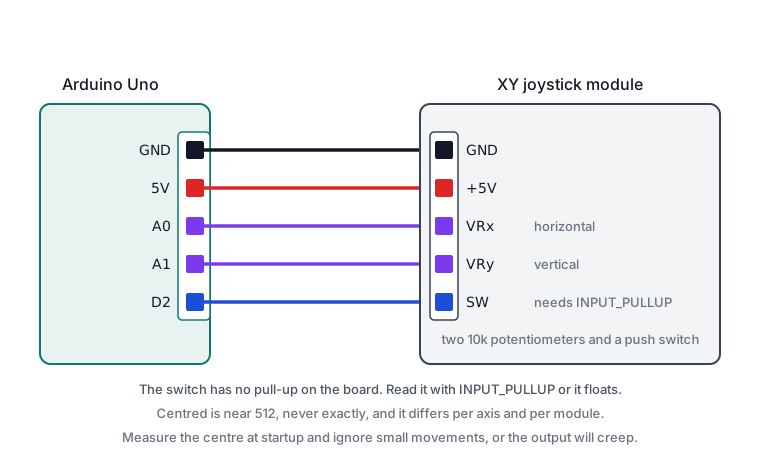
Wiring steps
- Unplug the USB cable.
GNDtoGND,+5Vto5V.VRxtoA0,VRytoA1.SWtoD2.- Plug the USB cable back in.
Software and libraries
No library is required.
Minimal working example
// Siratek: raw joystick values. Push in each direction and watch.

const int xPin = A0;
const int yPin = A1;
const int swPin = 2;

void setup() {
  pinMode(swPin, INPUT_PULLUP);
  Serial.begin(9600);
  Serial.println("Siratek: leave it centred first, then push each way.");
}

void loop() {
  Serial.print("x = ");
  Serial.print(analogRead(xPin));
  Serial.print("   y = ");
  Serial.print(analogRead(yPin));
  Serial.print("   button = ");
  Serial.println(digitalRead(swPin) == LOW ? "pressed" : "up");

  delay(200);
}
Write down four things: the two resting values, and which direction makes each axis rise. Those four facts are what the next sketch is built on.
Press the stick down as well. On many of these modules the button needs a firm push, and it is easy to conclude it is broken when it is only stiff.
Direction, with a dead zone
// Siratek: turning two numbers into a direction.

const int xPin = A0;
const int yPin = A1;
const int swPin = 2;

// Anything within this many counts of centre is "not moving".
const int deadZone = 120;

int centreX = 512;
int centreY = 512;

void setup() {
  pinMode(swPin, INPUT_PULLUP);
  Serial.begin(9600);

  // Measure this joystick's own centre. Hands off at startup.
  delay(500);
  long sumX = 0;
  long sumY = 0;
  for (int i = 0; i < 32; i++) {
    sumX += analogRead(xPin);
    sumY += analogRead(yPin);
    delay(5);
  }
  centreX = sumX / 32;
  centreY = sumY / 32;

  Serial.print("Siratek: centre measured at ");
  Serial.print(centreX);
  Serial.print(", ");
  Serial.println(centreY);
}

void loop() {
  int x = analogRead(xPin) - centreX;
  int y = analogRead(yPin) - centreY;

  if (abs(x) > deadZone || abs(y) > deadZone) {
    // Whichever axis has moved further decides the direction.
    if (abs(x) > abs(y)) {
      Serial.println(x > 0 ? "right" : "left");
    } else {
      Serial.println(y > 0 ? "up" : "down");
    }
  }

  if (digitalRead(swPin) == LOW) {
    Serial.println("pressed");
  }

  delay(150);
}
Measuring the centre in setup() rather than assuming 512 is what makes this work on any module, including one whose stick has worn. The only requirement is that nobody is touching it at startup, which is worth saying in your project’s instructions.
Comparing abs(x) with abs(y) picks the dominant axis, so a diagonal push reports one direction rather than flickering between two. If you want eight directions including diagonals, test each axis separately instead.
If the labels come out wrong for your module, negate the relevant comparison. That is the only change needed.
Driving a servo
// Siratek: the stick's horizontal axis steering a servo.

#include <Servo.h>

Servo arm;

const int xPin = A0;
int centreX = 512;

void setup() {
  arm.attach(9);
  delay(500);

  long sum = 0;
  for (int i = 0; i < 32; i++) {
    sum += analogRead(xPin);
    delay(5);
  }
  centreX = sum / 32;
}

void loop() {
  int x = analogRead(xPin);
  int angle;

  if (abs(x - centreX) < 40) {
    angle = 90;                                  // dead zone: hold centre
  } else if (x > centreX) {
    angle = map(x, centreX, 1023, 90, 180);
  } else {
    angle = map(x, 0, centreX, 0, 90);
  }

  arm.write(angle);
  delay(20);
}
The two separate map() calls are deliberate. Mapping 0 to 1023 straight onto 0 to 180 would put the servo’s centre wherever the joystick’s electrical midpoint happened to fall, which is not 90 degrees. Mapping each half independently means the stick’s real centre always gives 90, and both halves use their full travel.
Note the servo needs its own supply for anything beyond a bench test. See Controlling an SG90 Servo.
Expected result
Two numbers near the middle of the range when centred, sweeping towards 0 and 1023 as you push, and a button that reads LOW when the stick is pressed down.
Release the stick and the numbers should return close to where they started, though rarely to exactly the same value. That is the spring and the potentiometer, not a fault.
Troubleshooting
| Symptom | Likely cause | Check or fix |
|---|---|---|
| Button reads randomly | No pull-up | Use INPUT_PULLUP |
| Button never reads pressed | SW not connected, or stiff |
Check the wire, then press firmly |
| Centre is not 512 | Normal variation | Measure it at startup |
| Output creeps when untouched | No dead zone | Ignore small movements around centre |
| Axes swapped | Module orientation | Swap A0 and A1, or the names in code |
| Direction inverted | Potentiometer wiring | Negate that comparison |
| Reading stuck at 0 or 1023 | GND or 5V missing |
Check power before anything else |
| Values jump about | Loose lead | Reseat; average several readings |
| Servo centre is off | Single map() across the whole range |
Map each half separately |
| One axis has less range | Normal part variation | Use what you measured |
Next steps
- Easier first: Read a Potentiometer, which is one of the two inside this.
- Related products: an SG90 servo to steer, or an OLED to draw a cursor on.
- Next project: a two-servo pan and tilt mount driven by the stick.
Sources and attribution
All text, wiring guidance and code in this tutorial are original Siratek work.
- The five-pin
GND +5V VRx VRy SWheader, the two 10 kilohm potentiometers and the push switch under the stick were read from the Siratek product photographs for item 9972. - Arduino core documentation for
analogRead(),INPUT_PULLUPandmap().
Resting centre values and axis directions vary between modules, so this tutorial measures them rather than asserting them. No third-party tutorial text, diagrams, photographs or code has been reproduced here.