

01
Nov
Making a Button Behave
Draft. This tutorial has not been checked against the physical product yet. Confirm wiring, pin assignments and voltage limits against the product documentation before building it.
| Difficulty | Intermediate |
|---|---|
| Category | Concepts |
| Supported boards | Arduino Uno R3 and compatible ATmega328P boards |
| Time needed | 35 minutes |
| Prerequisites | Timing Without delay() |
| Tested board | Not yet verified |
| Tested on | Not yet verified |
| Arduino IDE version | Not yet verified |
| Library | Not yet verified |
What this covers
One press, three counts. This explains why a mechanical switch does that, and how to fix it without blocking the rest of your program.
Before you begin
A push button on pin 2, wired as in Read a Push Button, and the millis() pattern from Timing Without delay().
Why one press counts as several
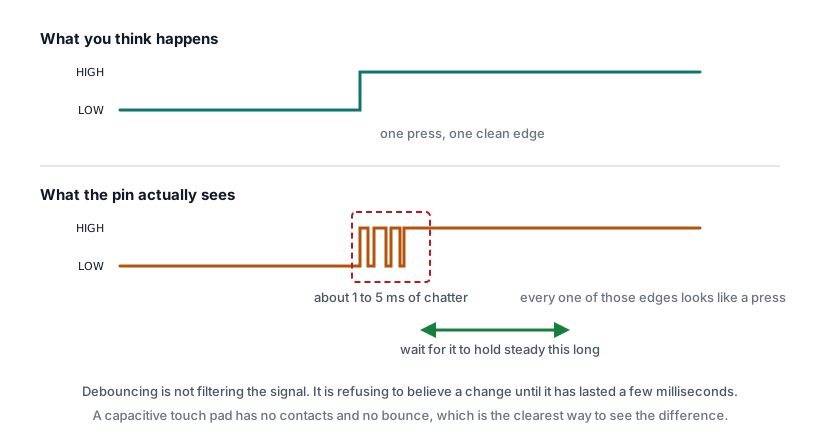
A switch is two pieces of metal springing together. They do not meet once and stay met. They touch, bounce apart, touch again, and settle, all within a few milliseconds.
You feel one press. The pin sees a burst of transitions.
An Uno reads that pin thousands of times a second, which is more than fast enough to catch every one of those bounces and count it as a separate press. The chip is not being unreliable. It is reporting exactly what happened, in more detail than you wanted.
Bounce lasts a few milliseconds on a fresh tactile switch and longer on a worn one. It gets worse over the life of a switch, which is why a project can start behaving badly months after it was built.
See it first
Before fixing it, watch it happen. This counts every change with no protection at all.
// Siratek: counting raw transitions, so the bounce is visible.

const int buttonPin = 2;
int lastState = HIGH;
int count = 0;

void setup() {
  pinMode(buttonPin, INPUT_PULLUP);
  Serial.begin(9600);
  Serial.println("Siratek: press once and watch the count.");
}

void loop() {
  int state = digitalRead(buttonPin);

  if (state != lastState) {
    count++;
    Serial.print("change ");
    Serial.println(count);
  }

  lastState = state;
}
Press once, slowly and deliberately. If you see several changes from one press, that is contact bounce. A clean switch may show only two, one for the press and one for the release. A worn one can show a dozen.
The fix
Ignore any further change for a short time after one is accepted. A few tens of milliseconds is longer than the bounce and far shorter than a human can press twice.
The blocking version is delay(50) after each accepted change, and it works. It also stops the whole program for 50 ms every press, which is exactly what Timing Without delay() said to avoid.
The non-blocking version uses the same millis() pattern.
// Siratek: debouncing a button without blocking.

const int buttonPin = 2;
const int ledPin = 9;

const unsigned long debounceTime = 50;   // Longer than the bounce, shorter than a press.

int steadyState = HIGH;      // The state we believe the button is in.
int lastReading = HIGH;      // What the pin said last pass.
unsigned long lastChange = 0;

int pressCount = 0;
bool ledOn = false;

void setup() {
  pinMode(buttonPin, INPUT_PULLUP);
  pinMode(ledPin, OUTPUT);
  Serial.begin(9600);
  Serial.println("Siratek: debounced button.");
}

void loop() {
  unsigned long now = millis();
  int reading = digitalRead(buttonPin);

  // Any change at all restarts the settling clock.
  if (reading != lastReading) {
    lastChange = now;
  }
  lastReading = reading;

  // Once the reading has held still long enough, believe it.
  if (now - lastChange >= debounceTime && reading != steadyState) {
    steadyState = reading;

    if (steadyState == LOW) {       // LOW is pressed, with INPUT_PULLUP.
      pressCount++;
      ledOn = !ledOn;
      digitalWrite(ledPin, ledOn);

      Serial.print("press ");
      Serial.println(pressCount);
    }
  }
}
Three variables carry the work. lastReading is the raw pin, which bounces. steadyState is what the program believes, which does not. lastChange records when the raw reading last moved, and the state is only believed once it has been still for longer than the bounce.
Note that the toggle happens on the press, not the release, because the test is steadyState == LOW. Changing it to HIGH acts on release instead, which feels different to use and is sometimes what you want.
Choosing the time
- Too short, under about 20 ms, and bounces still get through on a worn switch.
- Too long, over about 200 ms, and fast deliberate presses are swallowed.
- 50 ms suits almost everything. Raise it if a particular switch still double-counts.
Hardware debouncing
A capacitor across the switch, typically 100 nF, slows the voltage change enough to smooth the bounce away before the pin sees it.
It works, and it costs a component per switch. For one or two buttons the software version is simpler and free. Hardware debouncing earns its place when a signal has to be clean before it reaches an interrupt, where the software pattern above does not apply.
Check yourself
- One press gives three counts. Is the Arduino faulty?
- Why restart the clock on any change rather than only on a press?
- A project worked for a year and now double-counts. What changed?
- Why is
delay(50)a poor debounce in a project that also reads a sensor?
Answers in order: no, it is reporting real transitions. Because the settling period must cover the whole burst, in both directions. The switch has worn and bounces for longer. Because it stops the program for 50 ms each press, and the sensor is not read during that time.
Troubleshooting
| Symptom | Likely cause | Check or fix |
|---|---|---|
| Still double-counts | Debounce time too short | Raise it to 80 or 100 ms |
| Fast presses missed | Debounce time too long | Lower it towards 50 ms |
| Nothing registers | lastChange updated outside the change test |
It must only move when the reading changes |
| Reacts on release | Test is on HIGH |
Change it to LOW for press |
| Counts once then stops | steadyState never updated |
Assign reading to it inside the accepted branch |
| Breaks after 33 seconds | lastChange declared as int |
Make it unsigned long |
Next steps
- Easier first: Read a Push Button.
- Next: give the traffic light a pedestrian button that is read properly.
- Later: interrupts, for inputs that must be caught the instant they happen.
Sources and attribution
All text and code in this tutorial are original Siratek work.
- Arduino core documentation for
digitalRead(),INPUT_PULLUPandmillis().
Contact bounce durations are given as typical ranges for small tactile switches and vary with the part and its wear. No third-party tutorial text, diagrams, photographs or code has been reproduced here.