

01
Nov
Digital and Analog, and When Each Applies
Draft. This tutorial has not been checked against the physical product yet. Confirm wiring, pin assignments and voltage limits against the product documentation before building it.
| Difficulty | Intermediate |
|---|---|
| Category | Foundations |
| Supported boards | Arduino Uno R3 and compatible ATmega328P boards |
| Time needed | 35 minutes |
| Prerequisites | Read a Potentiometer |
| Tested board | Not yet verified |
| Tested on | Not yet verified |
| Arduino IDE version | Not yet verified |
| Library | Not yet verified |
What this covers
By now you have used all four of them: digitalRead(), digitalWrite(), analogRead() and analogWrite(). This page is about what those words actually mean on an Uno, because the naming is misleading in two places and both of them cause real confusion later.
Specifically: why analogRead() gives you 0 to 1023, why analogWrite() gives you 0 to 255, why those two ranges have nothing to do with each other, and why only one of the four is genuinely analog.
Before you begin
Nothing to wire. A potentiometer on A0 and an LED on pin 9 will let you try everything here, and both are already built if you have followed the earlier tutorials.
Digital: two states, and a gap between them
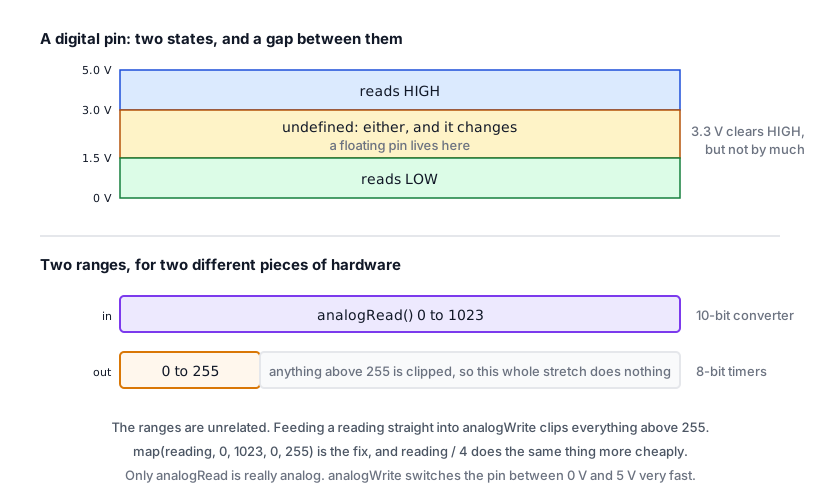
A digital pin deals in two values, and the chip decides which one it is seeing by comparing the voltage against two thresholds.
On a 5 V ATmega328P, roughly:
- Below about 1.5 V, the pin reads
LOW. - Above about 3.0 V, the pin reads
HIGH. - Between them is undefined. The pin reads one or the other, and which one is not something you can rely on.
That middle band is the part worth remembering, because it explains the floating-input problem from Read a Push Button. An unconnected input is not LOW. It sits somewhere in that undefined band, picking up interference, and reads whatever it likes. This is also why a long sensor cable with a weak signal can produce readings that change when you walk past.
digitalWrite() is the other direction, and it is genuinely two-valued: the pin is connected either to 5 V or to ground, through a transistor, with nothing in between.
Analog in: 1024 steps of a voltage
analogRead() is the only one of the four that is truly analog, and it works by comparison rather than measurement.
The ATmega328P has one analog-to-digital converter, shared between the six analog pins by a switch. It compares the pin’s voltage against a reference, which by default is the board’s own 5 V supply, and reports the result as a whole number from 0 to 1023.
That range is 1024 values because the converter is 10 bits wide, and two to the power of ten is
- There is nothing special about the number beyond that.
So each step is 5 V divided by 1023, a little under 5 millivolts. That is the finest distinction the Uno can make, and it sets a hard floor on what any sensor reading through this converter can resolve.
The reference is the thing to watch
The reading is a ratio against the reference voltage, not a measurement in volts. The conversion is:
volts = reading * 5.0 / 1023.0Which is only true if your board’s 5 V rail is really at 5 V. On USB power it is often 4.7 or 4.8, and it sags further under load. So a reading that looks like a stable measurement can drift as a motor starts, a backlight comes on, or the USB cable changes.
For threshold work this does not matter, because a potentiometer or an LDR divider is itself ratiometric: if the supply sags, both the divider output and the reference sag together and the reading stays put. For anything you want in real volts, it matters a great deal, and the answer is analogReference(INTERNAL), which switches to a 1.1 V reference built into the chip. That is far more stable, at the cost of only being able to measure up to 1.1 V.
It is not instant
Each conversion takes roughly 100 microseconds. Ten thousand readings a second is the rough ceiling, and that is before your sketch does anything with them. Usually irrelevant; occasionally the reason a loop is slower than expected.
Analog out: a fast switch pretending
analogWrite() is the misleading one. There is no analog output on an Uno. The pin is still only ever at 5 V or at 0 V.
What analogWrite() does is switch it between the two, quickly, and vary the proportion of time spent high. An LED averages that out as brightness because your eye cannot follow the switching. A motor averages it mechanically. A capacitor would average it electrically.
That is pulse width modulation, and Dimming and Speed Control with PWM covers it properly, including which pins can do it and which timers they share.
The thing to take from here is why the ranges differ. analogWrite() takes 0 to 255 because the timer counters doing the switching are 8 bits wide, and two to the eighth is 256. It is the same kind of reason as the 1024, about a different piece of hardware.
So the two ranges are unrelated, and this is the mistake to avoid:
// Wrong. 1023 goes in, 255 is the maximum, so everything above 255 is clipped.
int reading = analogRead(A0);
analogWrite(ledPin, reading);
// Right.
int reading = analogRead(A0);
analogWrite(ledPin, map(reading, 0, 1023, 0, 255));Or, since the scaling is exactly four, reading / 4 does the same thing and is cheaper. map() is clearer and survives you changing your mind about the range, which is usually worth more than the few microseconds.
Which pins can do what
Digital pins D0 to D13 |
Analog pins A0 to A5 |
|
|---|---|---|
digitalRead() |
Yes | Yes |
digitalWrite() |
Yes | Yes |
analogRead() |
No | Yes |
analogWrite() |
Only 3, 5, 6, 9, 10, 11 |
No |
The two bold entries surprise people and are genuinely useful. The analog pins are ordinary digital pins as well. If you run out of digital pins, A0 to A5 will take a button or an LED exactly as D2 would, using the names A0 and so on:
pinMode(A0, INPUT_PULLUP);
if (digitalRead(A0) == LOW) {
  // button pressed
}
That is six more pins than most people realise they have. The catch is that A4 and A5 are the I2C bus, so a display or sensor on the bus takes them.
Choosing between them
When a part gives you a choice, the question is what you are actually asking.
- “Has something happened?” is digital. A button, a tilt sensor, a PIR module.
- “How much?” is analog. A potentiometer, an LDR, a soil probe.
Many sensor modules offer both: an AO pin giving the raw level and a DO pin giving a yes-or-no against a threshold set by a trimmer on the board. The flame sensor, the sound sensor and the soil probe all work this way.
Prefer the analog pin while you are developing, even if the project only needs a yes or no. The analog reading tells you what is really happening and lets you choose the threshold from measured numbers. The digital pin hides all of that behind a screw you have to adjust by trial and error.
Switch to the digital pin at the end, if you need the Arduino pin back.
Check yourself
- A sensor reads 512. What voltage is on the pin, and how confident should you be in that answer?
- Why does
analogWrite(pin, 1023)not give you full brightness in a useful way? - An input pin with nothing connected reads HIGH sometimes and LOW other times. What is happening?
- You have used every digital pin and need one more button. What is still available?
Answers in order: about 2.5 V, assuming the 5 V rail really is at 5 V, which on USB it often is not. Because analogWrite() saturates at 255; the call is clipped, so 1023 and 255 do the same thing and the rest of your range does nothing. The pin is floating in the undefined band between the thresholds and picking up interference; use INPUT_PULLUP. A0 to A5 work as digital pins, less any taken by I2C.
Troubleshooting
| Symptom | Likely cause | Check or fix |
|---|---|---|
| LED brightness jumps straight to full | Feeding a 0 to 1023 value into analogWrite() |
map() it to 0 to 255 |
analogRead() on a digital pin returns nonsense |
Only A0 to A5 have the converter |
Move the sensor |
analogWrite() does nothing on pin 7 |
Not a PWM pin | Use 3, 5, 6, 9, 10 or 11 |
| Readings drift when a motor or backlight runs | The 5 V reference is sagging | Expect it; or use analogReference(INTERNAL) |
| Voltage calculation is consistently a few percent out | Rail is not exactly 5 V | Measure the rail and use the real figure |
| Unconnected input reads randomly | Floating, in the undefined band | INPUT_PULLUP, or an external resistor |
| Sensor’s digital output never triggers | Threshold trimmer set wrong | Read the analog pin and set it from real numbers |
| Analog readings wobble by a few counts | Normal converter noise | Average several readings |
Next steps
- Easier first: Read a Potentiometer, which is
analogRead()in its simplest form. - Related: Dimming and Speed Control with PWM, for what
analogWrite()is really doing. - Later: Reading a Datasheet, for finding a part’s own limits rather than the board’s.
Sources and attribution
All text and code in this tutorial are original Siratek work.
- ATmega328P datasheet for the input threshold voltages, the 10-bit converter, conversion time and the 8-bit timer resolution behind
analogWrite(). - Arduino core documentation for
analogReference()and for which pins support PWM.
Logic threshold voltages are given as approximate figures, because the datasheet states them as fractions of the supply voltage rather than fixed values. No third-party tutorial text, diagrams, photographs or code has been reproduced here.