

01
Nov
Project, a Smart Alarm Clock
Draft. This tutorial has not been checked against the physical product yet. Confirm wiring, pin assignments and voltage limits against the product documentation before building it.
| Difficulty | Intermediate |
|---|---|
| Category | Projects |
| Supported boards | Arduino Uno R3 and compatible ATmega328P boards |
| Time needed | 150 minutes |
| Prerequisites | Keeping Time with a DS3231 |
| Tested board | Not yet verified |
| Tested on | Not yet verified |
| Arduino IDE version | Not yet verified |
| Library | Not yet verified |
What you will build
A clock that shows the time on a 16×2 display, lets you set an alarm with buttons, and wakes you with a tune. Press to snooze, hold to stop.
It is the most interactive project in the library, and that is what it teaches. The others read sensors and report; this one has to listen to a person, which means a menu, buttons that behave differently on a press and a hold, and a display that shows the right thing at the right time.
Before you begin
Parts
| Part | Siratek product | Its own tutorial |
|---|---|---|
| Arduino Uno | 2219 | Getting Started with Arduino Uno |
| 16×2 LCD with I2C backpack | 2484 | A 16×2 LCD over I2C |
| DS3231 real time clock | 2522 | Keeping Time with a DS3231 |
| Passive buzzer | 8051 | Play Tones with a Passive Buzzer |
| Three tactile push buttons | 49488 | Read a Push Button |
| Breadboard and jumper wires | Using a Breadboard |
Three buttons: Mode, Up and Down. All three wired to ground with INPUT_PULLUP, so no resistors are needed.
Two addresses on one bus
The display and the clock both sit on A4 and A5. The display’s backpack answers at 0x27 or 0x3F, and the clock at 0x68, so they do not clash.
Run the bus scanner first and note which address your backpack uses. A 16×2 LCD over I2C explains why it is a coin toss and why copying 0x27 from a tutorial is a poor idea.
Buttons are the hard part, not the clock
This is worth saying before you start, because it shapes the whole sketch.
Reading a button is trivial. Making three buttons feel right is not, and a clock that is annoying to set is a clock nobody sets. Three behaviours are needed:
- A press: a single, debounced action. Used for Mode, and for snooze.
- A repeat: hold Up and the minutes should keep climbing, slowly at first then faster. Otherwise setting an alarm for 06:45 means forty-five separate presses.
- A long hold: distinct from a press. Used to stop the alarm, so a sleepy hand cannot cancel it by accident.
All three come from one small piece of code, below, and that piece is the most reusable thing in this project.
How it works
Modes
The clock is always in exactly one mode, and Mode cycles between them:
| Mode | Shows | Up and Down |
|---|---|---|
SHOW_TIME |
Time, date, alarm | Nothing |
SET_ALARM_HOUR |
Alarm, hour flashing | Change the hour |
SET_ALARM_MINUTE |
Alarm, minute flashing | Change the minute |
SET_ALARM_ONOFF |
Alarm on or off | Toggle it |
Pressing Mode from the last one returns to SHOW_TIME and saves. The same state-machine idea as the pedestrian crossing, with a person driving the transitions instead of a timer.
Ringing
When the alarm time arrives and the alarm is on, the clock enters a ringing state:
- Press any button: snooze for nine minutes.
- Hold Mode for two seconds: stop until tomorrow.
- After ten minutes with no response: give up, so a clock in an empty house does not sound all day.
The alarm fires on a minute match, and the sketch records which minute it fired in so it does not fire again within the same minute.
Remembering the alarm
The alarm setting is kept in the Uno’s EEPROM, so it survives power being removed. Without that, every power cut loses the setting, which for a clock is most of the point.
EEPROM has a finite write endurance, around a hundred thousand writes per location, so the sketch writes only when the setting changes, not on every loop. Writing in loop() would use that up in a day.
Pin reference
| Device | Pin | Connect to |
|---|---|---|
| LCD backpack | GND, VCC |
Uno GND, 5V |
| LCD backpack | SDA, SCL |
Uno A4, A5 |
| DS3231 | GND, VCC |
Uno GND, 5V |
| DS3231 | SDA, SCL |
Uno A4, A5 |
| Buzzer | + |
Uno D9 |
| Buzzer | - |
Uno GND |
| Mode button | Uno D2 to GND |
|
| Up button | Uno D3 to GND |
|
| Down button | Uno D4 to GND |
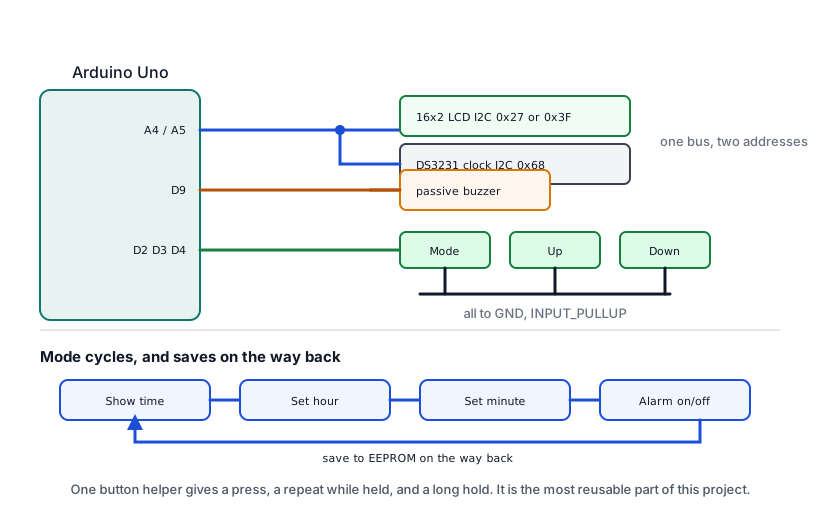
Build it in stages
Stage 1: scan, then show the time
Run the bus scanner and note both addresses. Then put the time on the display, with no buttons and no alarm. That alone is a working clock and proves the two hardest parts.
Leave it running while you build the rest.
Stage 2: one button, printing to serial
Get the button helper below working with the Mode button and Serial.print(). Check that a press reports once, a hold repeats, and a long hold reports separately.
Do this before touching the display. Button behaviour is fiddly, and debugging it through a 16-character screen is miserable.
Stage 3: the modes
Add Up and Down, and the four modes, still printing to serial. Then put the modes on the display.
Stage 4: the alarm
Add the buzzer, the ringing state and the EEPROM. The complete sketch below.
The complete sketch
// Siratek: a smart alarm clock.
// LCD and DS3231 share I2C; three buttons to ground; a passive buzzer.

#include <Wire.h>
#include <LiquidCrystal_I2C.h>
#include <RTClib.h>
#include <EEPROM.h>

// Use the address your scanner printed.
LiquidCrystal_I2C lcd(0x27, 16, 2);
RTC_DS3231 rtc;

const int buzzerPin = 9;
const int MODE_BTN = 2, UP_BTN = 3, DOWN_BTN = 4;

const int EEPROM_HOUR = 0, EEPROM_MINUTE = 1, EEPROM_ON = 2, EEPROM_MAGIC = 3;
const byte MAGIC = 0x5A;          // says "these bytes are ours"

enum Mode { SHOW_TIME, SET_ALARM_HOUR, SET_ALARM_MINUTE, SET_ALARM_ONOFF };
Mode mode = SHOW_TIME;

byte alarmHour = 7, alarmMinute = 0;
bool alarmOn = false;
bool settingChanged = false;

bool ringing = false;
unsigned long ringingSince = 0;
int firedInMinute = -1;           // so it fires once per minute, not repeatedly

unsigned long lastDraw = 0;

// ---------------------------------------------------------------- buttons

struct Button {
  byte pin;
  bool stable;                    // debounced level, true when pressed
  unsigned long changedAt;
  unsigned long pressedAt;
  unsigned long lastRepeat;
  bool longFired;
};

Button buttons[3];

void setupButton(Button& b, byte pin) {
  pinMode(pin, INPUT_PULLUP);
  b.pin = pin;
  b.stable = false;
  b.changedAt = b.pressedAt = b.lastRepeat = 0;
  b.longFired = false;
}

// Returns: 0 nothing, 1 a press, 2 a repeat, 3 a long hold.
byte pollButton(Button& b) {
  bool now = (digitalRead(b.pin) == LOW);

  if (now != b.stable) {
    if (millis() - b.changedAt < 30) {
      return 0;                   // still bouncing
    }
    b.changedAt = millis();
    b.stable = now;

    if (now) {
      b.pressedAt = millis();
      b.lastRepeat = millis();
      b.longFired = false;
      return 1;                   // the moment of the press
    }
    return 0;                     // release
  }

  if (!b.stable) {
    return 0;
  }

  unsigned long held = millis() - b.pressedAt;

  if (held > 2000 && !b.longFired) {
    b.longFired = true;
    return 3;
  }

  // Repeat while held: slow at first, then faster.
  if (held > 600) {
    unsigned long gap = (held > 3000) ? 80 : 250;
    if (millis() - b.lastRepeat >= gap) {
      b.lastRepeat = millis();
      return 2;
    }
  }

  return 0;
}

// ---------------------------------------------------------------- storage

void loadAlarm() {
  if (EEPROM.read(EEPROM_MAGIC) != MAGIC) {
    // First run on this board: EEPROM holds whatever it held.
    saveAlarm();
    return;
  }
  alarmHour = EEPROM.read(EEPROM_HOUR);
  alarmMinute = EEPROM.read(EEPROM_MINUTE);
  alarmOn = EEPROM.read(EEPROM_ON) != 0;

  if (alarmHour > 23) alarmHour = 7;
  if (alarmMinute > 59) alarmMinute = 0;
}

void saveAlarm() {
  // EEPROM.update writes only if the value differs, which saves the endurance.
  EEPROM.update(EEPROM_HOUR, alarmHour);
  EEPROM.update(EEPROM_MINUTE, alarmMinute);
  EEPROM.update(EEPROM_ON, alarmOn ? 1 : 0);
  EEPROM.update(EEPROM_MAGIC, MAGIC);
}

// ---------------------------------------------------------------- display

void two(byte v) {
  if (v < 10) lcd.print('0');
  lcd.print(v);
}

void draw() {
  DateTime now = rtc.now();

  lcd.setCursor(0, 0);
  if (ringing) {
    lcd.print(F("** ALARM **     "));
  } else {
    two(now.hour()); lcd.print(':');
    two(now.minute()); lcd.print(':');
    two(now.second());
    lcd.print(F("   "));
    two(now.day()); lcd.print('/');
    two(now.month());
  }

  lcd.setCursor(0, 1);
  switch (mode) {
    case SHOW_TIME:
      lcd.print(F("Alarm "));
      two(alarmHour); lcd.print(':'); two(alarmMinute);
      lcd.print(alarmOn ? F(" on ") : F(" off"));
      lcd.print(F("   "));
      break;
    case SET_ALARM_HOUR:
      lcd.print(F("Set hour   "));
      two(alarmHour); lcd.print(':'); two(alarmMinute);
      break;
    case SET_ALARM_MINUTE:
      lcd.print(F("Set minute "));
      two(alarmHour); lcd.print(':'); two(alarmMinute);
      break;
    case SET_ALARM_ONOFF:
      lcd.print(alarmOn ? F("Alarm: on       ") : F("Alarm: off      "));
      break;
  }
}

// ------------------------------------------------------------------ alarm

const int melody[] = {880, 988, 1047, 988};
int melodyStep = 0;
unsigned long lastNote = 0;

void ringTune() {
  if (millis() - lastNote >= 350) {
    lastNote = millis();
    tone(buzzerPin, melody[melodyStep], 200);
    melodyStep = (melodyStep + 1) % 4;
  }
}

void startRinging() {
  ringing = true;
  ringingSince = millis();
  melodyStep = 0;
}

void stopRinging() {
  ringing = false;
  noTone(buzzerPin);
}

void snooze() {
  stopRinging();
  // Nine minutes on, as alarm clocks have always done.
  alarmMinute = (alarmMinute + 9) % 60;
  if (alarmMinute < 9) {
    alarmHour = (alarmHour + 1) % 24;
  }
  firedInMinute = -1;
  settingChanged = true;
}

// ------------------------------------------------------------------- main

void setup() {
  Serial.begin(9600);

  lcd.init();
  lcd.backlight();
  lcd.setCursor(0, 0);
  lcd.print(F("Siratek clock"));

  if (!rtc.begin()) {
    lcd.setCursor(0, 1);
    lcd.print(F("No clock found"));
    while (1) { delay(100); }
  }
  if (rtc.lostPower()) {
    rtc.adjust(DateTime(F(__DATE__), F(__TIME__)));
  }

  setupButton(buttons[0], MODE_BTN);
  setupButton(buttons[1], UP_BTN);
  setupButton(buttons[2], DOWN_BTN);

  pinMode(buzzerPin, OUTPUT);
  loadAlarm();

  delay(800);
  lcd.clear();
}

void adjust(int delta) {
  switch (mode) {
    case SET_ALARM_HOUR:
      alarmHour = (alarmHour + 24 + delta) % 24;
      settingChanged = true;
      break;
    case SET_ALARM_MINUTE:
      alarmMinute = (alarmMinute + 60 + delta) % 60;
      settingChanged = true;
      break;
    case SET_ALARM_ONOFF:
      alarmOn = !alarmOn;
      settingChanged = true;
      break;
    default:
      break;
  }
}

void loop() {
  byte modeEvent = pollButton(buttons[0]);
  byte upEvent   = pollButton(buttons[1]);
  byte downEvent = pollButton(buttons[2]);

  if (ringing) {
    ringTune();

    if (modeEvent == 3) {                  // held: stop until tomorrow
      stopRinging();
    } else if (modeEvent == 1 || upEvent == 1 || downEvent == 1) {
      snooze();
    } else if (millis() - ringingSince > 600000UL) {
      stopRinging();                       // give up after ten minutes
    }
  } else {
    if (modeEvent == 1) {
      mode = (Mode) ((mode + 1) % 4);
      if (mode == SHOW_TIME && settingChanged) {
        saveAlarm();
        settingChanged = false;
      }
      lcd.clear();
    }

    if (upEvent == 1 || upEvent == 2)   adjust(+1);
    if (downEvent == 1 || downEvent == 2) adjust(-1);

    DateTime now = rtc.now();
    if (alarmOn
        && now.hour() == alarmHour
        && now.minute() == alarmMinute
        && firedInMinute != now.minute()) {
      firedInMinute = now.minute();
      startRinging();
      lcd.clear();
    }
  }

  // Redraw four times a second, not every pass.
  if (millis() - lastDraw >= 250) {
    lastDraw = millis();
    draw();
  }
}
The three decisions that matter most
pollButton() returns an event, not a state. One function, three behaviours, and the rest of the sketch reads as “if the Mode button was pressed” rather than fiddling with timestamps. It is the most reusable thing here; lift it into your next project.
EEPROM.update(), not EEPROM.write(). update() reads first and writes only if the value differs. On a clock that saves whenever a setting changes, that is the difference between using a handful of the EEPROM’s hundred thousand writes and using them all.
The display is redrawn four times a second, not every pass of loop(). The LCD is slow, and redrawing it constantly makes the buttons feel unresponsive because the loop spends its time talking to the screen.
Testing it
| Try this | It should |
|---|---|
| Watch the seconds | Advance steadily, no stutter |
| Press Mode four times | Cycle the modes and return to the time |
| Hold Up in minute mode | Climb slowly, then speed up after a few seconds |
| Set an alarm a minute ahead | Ring at the right moment |
| Press any button while ringing | Snooze; it rings again nine minutes later |
| Hold Mode while ringing | Stop, and not ring again today |
| Set an alarm, unplug, plug back in | Keep the alarm setting and the time |
| Leave it ringing | Give up after ten minutes |
The seventh is the one that proves the EEPROM and the clock battery are both doing their jobs, and it is the reason this is a clock rather than a demonstration.
Making it yours
- A light that comes on before the alarm. An LED or a relay, switched fifteen minutes early and brightened with PWM. Waking to light is pleasanter than waking to sound.
- Temperature on the display. The DS3231 measures its own, free:
rtc.getTemperature(). It reads a little high, which Keeping Time with a DS3231 explains. - A proper tune. The melody here is four notes. Play Tones with a Passive Buzzer has the note tables.
- Dim the backlight at night. The backpack’s backlight jumper can be replaced with a transistor on a PWM pin.
- Set the time from the buttons. The sketch sets the alarm but not the clock. Two more modes and the same
adjust()pattern, and you no longer need to recompile to correct it.
That last one is a genuinely good exercise, because it reuses everything already here.
Troubleshooting
| Symptom | Likely cause | Check or fix |
|---|---|---|
| Display blank, backlight on | Contrast | Turn the blue trimmer through its range |
| Nothing found on the bus | SDA and SCL swapped |
SDA is A4, SCL is A5 |
| Display works, clock not found | Address, or the coin cell | Scan; expect 0x68 |
| Time resets on every power-up | adjust() unconditional |
Guard it with lostPower() |
| Alarm lost on power-up | Not saved to EEPROM | saveAlarm() when leaving the menus |
| Buttons feel sluggish | Display redrawn every pass | Redraw four times a second |
| One press changes the hour twice | Not debounced | Check the 30 ms guard |
| Hold does not repeat | Repeat branch not reached | It starts after 600 ms |
| Alarm rings repeatedly in one minute | firedInMinute not set |
It is set when ringing starts |
| Buzzer silent | Active buzzer, not passive | tone() needs a passive one |
| Snooze sets a strange time | Hour not carried | The % 60 wrap needs the hour bump |
| Display garbled after hours | Noise on a long I2C run | Shorten the leads |
Sources and attribution
All text, wiring guidance and code in this project are original Siratek work.
- Component behaviour is as described in A 16×2 LCD over I2C, Keeping Time with a DS3231, Play Tones with a Passive Buzzer and Read a Push Button, including the backpack’s variable address, the
lostPower()behaviour and thetone()timer conflict. - EEPROM write endurance is from the ATmega328P datasheet.
The nine-minute snooze is the long-standing convention rather than anything required. No third-party tutorial text, diagrams, photographs or code has been reproduced here.