

01
Nov
Water Level and Rain Detection
Draft. This tutorial has not been checked against the physical product yet. Confirm wiring, pin assignments and voltage limits against the product documentation before building it.
| Difficulty | Beginner |
|---|---|
| Category | Sensors |
| Supported boards | Arduino Uno R3 and compatible ATmega328P boards |
| Time needed | 40 minutes |
| Prerequisites | Reading Soil Moisture |
| Tested board | Not yet verified |
| Tested on | Not yet verified |
| Arduino IDE version | Not yet verified |
| Library | Not yet verified |
What it does
A red board with a comb of interleaved copper tracks. Water bridging the tracks lowers the resistance between them, and the further up the comb the water reaches, the more tracks are bridged and the lower the resistance goes.
So it is really a water level sensor that happens to notice rain as well. Dip it in a tank and the reading tracks the depth. Leave it out in the open and a few drops landing across the tracks will move it, though not in any way you could call a rain gauge.
Electrically it is the soil moisture probe again, which means the two warnings from that page apply here in full.
Before you begin
Required parts and tools
- An Arduino Uno or compatible board.
- One water sensor board. This is Siratek product 2923.
- Three jumper wires.
One board, three pins, analog only
The Siratek part is a single board, marked Water Sensor, with a three-pin header labelled
S + -
S is the signal, + is power and - is ground. There is also a small Power LED and a transistor.
That is worth being clear about, because this part is often confused with the rain-drop sensor kit, which is two pieces: a collector plate plus a comparator board with a trimmer and both an AO and a DO pin.
This board has no comparator, no trimmer and no digital output. You read S with analogRead() and choose your own threshold in software, which is the better way round anyway.
It measures conductivity, not water
As with the soil probe, what changes is the conductivity of whatever bridges the tracks.
Tap water, rain water and salty water give different readings at the same depth. Distilled water barely registers at all, because it hardly conducts. So the reading tells you about this water, in this container, and every threshold has to be measured where it will be used.
It corrodes, and faster than the soil probe
The tracks are bare copper sitting in water with a voltage across them. That is electroplating, and it will eat the comb.
In continuously damp conditions a board like this can degrade in weeks. The soil probe at least spends time in drier earth; a level sensor in a tank is permanently wet.
The fix is the same one, and it matters more here: power it from a digital pin and switch it on only while reading. The examples below do that. A tank level that is checked once a minute means the board is live for a fraction of a second an hour.
For anything permanent outdoors, a non-contact sensor is the right answer: an ultrasonic HC-SR04 pointed down at the water surface measures depth without touching it at all, and will outlive this board many times over. That tutorial already exists.
Only the comb goes in the water
The header, the LED and the transistor are at the top of the board and are not waterproof. Submerge the whole thing and you short the supply across the electronics.
The silkscreen marks roughly how far it can go in. Keep the top third dry, and if the board will live in a tank, seal the upper section with hot glue or heatshrink and let only the tracks be wet.
Pin reference
| Pin or label | Connect to | Purpose | Notes |
|---|---|---|---|
+ |
Uno D7 |
Power, switched | Not the 5V rail, so the comb only corrodes while reading |
- |
Uno GND |
Ground | |
S |
Uno A0 |
Analog signal | Rises as more of the comb is wet |
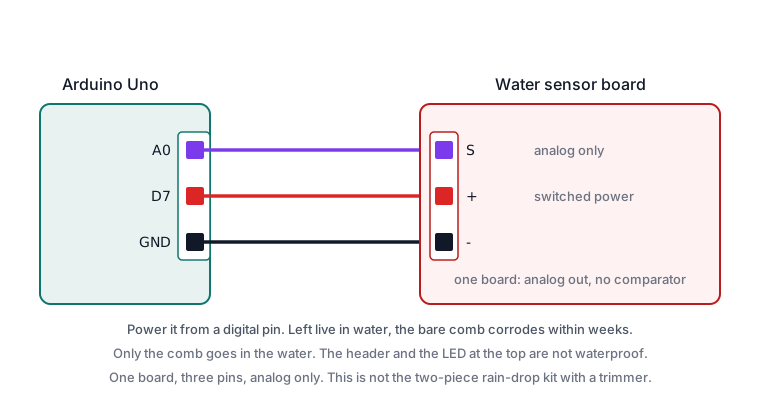
Wiring steps
- Unplug the USB cable.
-toGND.+toD7. Not to5V.StoA0.- Plug the USB cable back in. The power LED stays dark until the sketch drives
D7high, which is correct.
Software and libraries
No library is required.
Minimal working example
// Siratek: measure your own range. Dry, then a little, then deep.

const int sensorPin = A0;
const int powerPin = 7;

void setup() {
  pinMode(powerPin, OUTPUT);
  digitalWrite(powerPin, LOW);

  Serial.begin(9600);
  Serial.println("Siratek: try it dry, then dip it a little, then deeper.");
}

void loop() {
  digitalWrite(powerPin, HIGH);
  delay(100);
  int reading = analogRead(sensorPin);
  digitalWrite(powerPin, LOW);

  Serial.print("reading = ");
  Serial.println(reading);

  delay(1000);
}
Dip the comb in stages and write down the numbers: dry, the first track covered, half way, and fully covered. Those four values are the scale you have to work with, and they will not be evenly spaced.
They are also specific to your water. Repeat the exercise with the water the project will actually be in.
A tank that reports its level
// Siratek: a coarse level, from readings you measured yourself.

const int sensorPin = A0;
const int powerPin = 7;

// Replace every one of these with your own measurements.
const int dryBelow = 60;
const int lowBelow = 300;
const int halfBelow = 520;

const unsigned long interval = 60000UL;
unsigned long lastCheck = 0;

int readLevel() {
  digitalWrite(powerPin, HIGH);
  delay(100);

  long total = 0;
  for (int i = 0; i < 8; i++) {
    total += analogRead(sensorPin);
    delay(5);
  }

  digitalWrite(powerPin, LOW);
  return total / 8;
}

void setup() {
  pinMode(powerPin, OUTPUT);
  digitalWrite(powerPin, LOW);
  Serial.begin(9600);
  lastCheck = millis() - interval;
}

void loop() {
  if (millis() - lastCheck < interval) {
    return;
  }
  lastCheck = millis();

  int reading = readLevel();

  Serial.print("reading = ");
  Serial.print(reading);
  Serial.print("   level: ");

  if (reading < dryBelow) {
    Serial.println("empty");
  } else if (reading < lowBelow) {
    Serial.println("low");
  } else if (reading < halfBelow) {
    Serial.println("about half");
  } else {
    Serial.println("full");
  }
}
Four coarse bands is about as much as this part honestly supports. It is not a depth gauge, and a sketch that reports centimetres from it is inventing precision that is not there.
Averaging eight readings matters here more than with the soil probe, because water moves and the reading moves with it.
A rain alarm
// Siratek: something wet landed on it.

const int sensorPin = A0;
const int powerPin = 7;
const int buzzerPin = 8;

const int wetAbove = 120;             // measure your own dry reading first
const unsigned long mustPersist = 3000;

unsigned long firstWet = 0;
bool alarming = false;

void setup() {
  pinMode(powerPin, OUTPUT);
  pinMode(buzzerPin, OUTPUT);
  digitalWrite(powerPin, LOW);
  Serial.begin(9600);
}

void loop() {
  digitalWrite(powerPin, HIGH);
  delay(100);
  int reading = analogRead(sensorPin);
  digitalWrite(powerPin, LOW);

  if (reading > wetAbove) {
    if (firstWet == 0) {
      firstWet = millis();
    } else if (!alarming && millis() - firstWet >= mustPersist) {
      alarming = true;
      digitalWrite(buzzerPin, HIGH);
      Serial.println("RAIN");
    }
  } else {
    firstWet = 0;
    if (alarming) {
      alarming = false;
      digitalWrite(buzzerPin, LOW);
      Serial.println("dry");
    }
  }

  delay(1000);
}
The three-second persistence stops a single splash setting it off, and it is the same pattern as the flame sensor. Note the board stays wet for a while after rain stops, so “dry” lags reality by minutes.
Expected result
A low reading in air, rising as more of the comb is covered, and falling back as it dries. The power LED should flash briefly once per reading rather than staying lit.
Dry it with a cloth and the reading should fall close to its original value. If it settles higher than it started, there is a film of water between the tracks, which is normal and takes a few minutes to clear.
Troubleshooting
| Symptom | Likely cause | Check or fix |
|---|---|---|
| Reading never changes | S not on A0 |
Check the signal wire |
| Reading always high | Board wet above the tracks | Dry it; keep the top third out |
| Power LED always on | + on the 5V rail |
Move it to a digital pin |
| Tracks look dark or pitted | Corroded | Switch the power; consider HC-SR04 |
| Readings fall over weeks | Corrosion in progress | Same |
| Different in tap and rain water | It measures conductivity | Measure in the water you will use |
| Nothing from distilled water | It barely conducts | Expected |
| Reading unstable | Water moving, no averaging | Average eight readings |
| Stays wet long after rain | Water film between tracks | Expected; allow for the lag |
| Board died in a tank | Whole board submerged | Only the comb is meant to be wet |
Next steps
- Easier first: Reading Soil Moisture, which is the same divider in earth.
- Related products: the HC-SR04, for measuring depth without touching the water.
- Next project: a tank alarm that sounds when the level drops, with the sensor sealed above the comb.
Sources and attribution
All text, wiring guidance and code in this tutorial are original Siratek work.
- The single-board construction, the
S + -header, theWater Sensorsilkscreen and the absence of any comparator or trimmer were read from the Siratek product photographs for item
- That is what establishes this as an analog-only part rather than the two-piece rain-drop kit it is often confused with.
Every threshold is presented as something the reader must measure in their own water. The corrosion behaviour is a property of passing current between bare electrodes in water rather than a fault. No third-party tutorial text, diagrams, photographs or code has been reproduced here.